

ePrepare Academy is an online MDCAT academy built around one app. Instead of juggling textbooks, PDF notes, a separate past-paper book and a WhatsApp group for doubts, everything sits in one account that works on your phone and your laptop. This guide walks through every feature, what it does, and how it helps you score higher in MDCAT.
If you are short on time, the summary is simple: learn a chapter, practise it line by line, test yourself under real timing, and let the app show you what to fix next. Each feature below fits into one of those four steps.
Practise: MCQs from every angle
MDCAT is an MCQ exam, so most of your marks come from practice. ePrepare gives you several kinds of MCQs, each for a different job.
Bookline MCQs
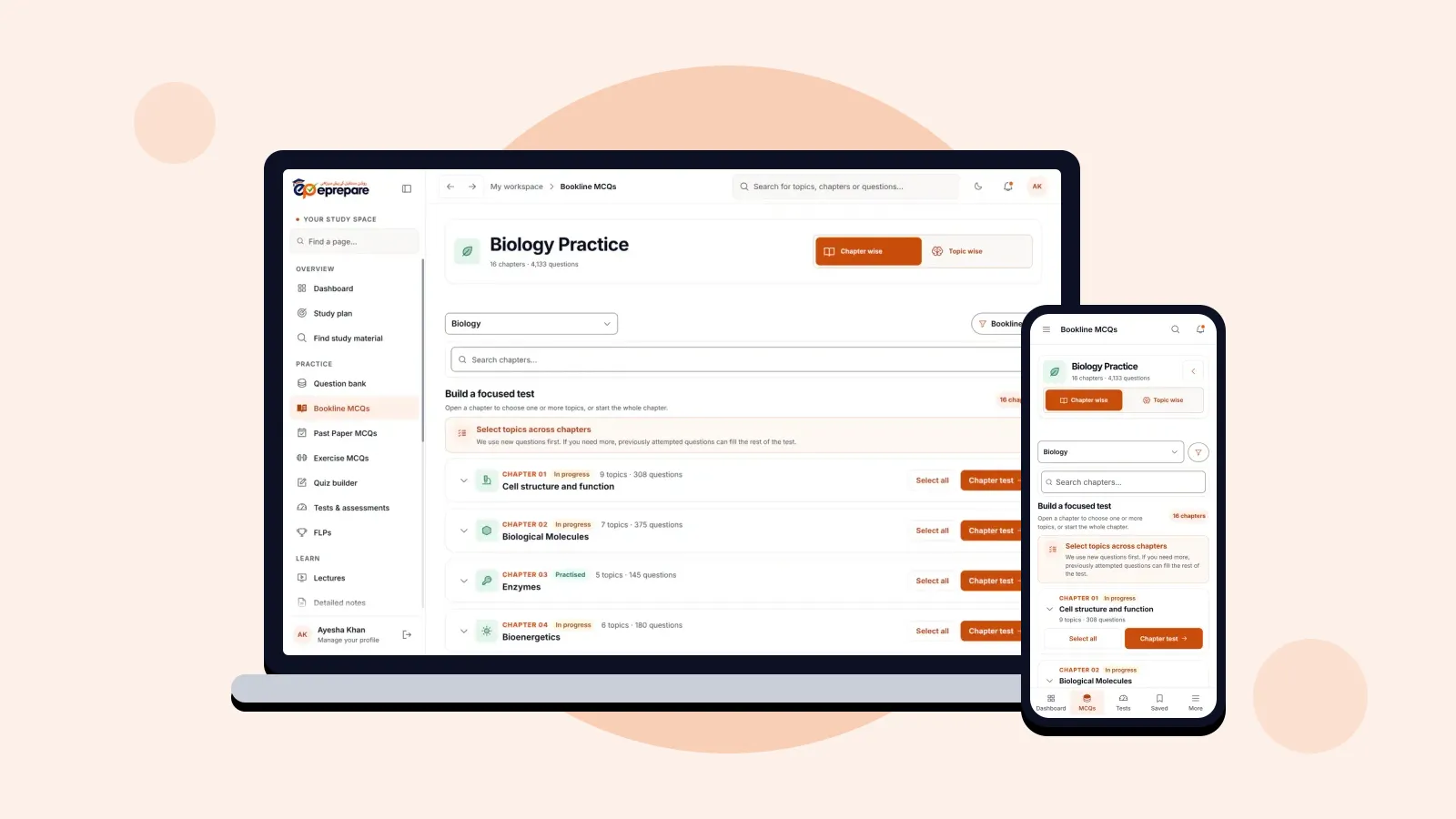
Bookline MCQs turn the KPK textbooks into practice questions, line by line and chapter by chapter. You work through a chapter exactly as it is written in the book, and new questions come first, so you are not shown the same ones again and again.
How it helps: MDCAT questions come from the textbook. Practising every line means a sentence you skimmed in the book does not surprise you in the exam hall, and your progress on each chapter shows how much of the book you have really covered.
Past paper MCQs by province
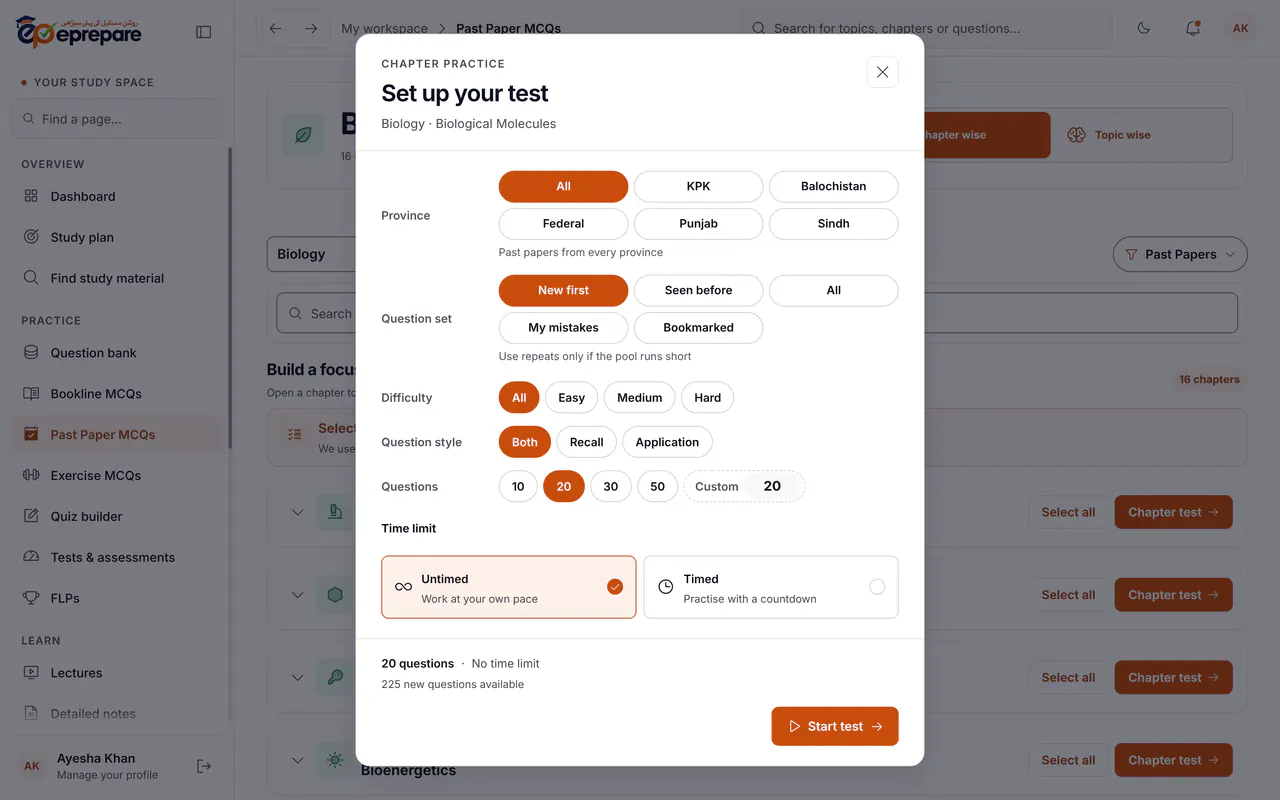
There are 7,285 past-paper MCQs from MDCAT, ETEA, UHS, NUMS and more, filed under KPK, Balochistan, Federal, Punjab and Sindh. You can practise one province's papers or all of them, and choose new questions, ones you have already seen, your mistakes or your bookmarks. Difficulty, number of questions and the timer are yours to set.
How it helps: past papers show you how examiners actually ask about a topic. Practising them by province prepares you for the paper you will sit, while the other provinces' papers show you new ways the same concept can be tested.
A 50,000+ MCQ question bank
The question bank holds more than 50,000 topical MCQs for every chapter and topic of Physics, Chemistry, Biology, English and Logical Reasoning. Every MCQ has a detailed explanation, in Urdu as well as English, and a hint you can open before you answer.
How it helps: a wrong answer is only useful if you understand why it was wrong. Explanations in the language you think in make the reason clear, and the hint lets you work towards the answer yourself instead of just reading it.
Exercise MCQs, Revision MCQs and the Koshish series
Exercise MCQs follow the book exercises board by board, for the KPK, Federal and Punjab books. Revision MCQs, new for 2027, help you go back over chapters you have already finished. The Koshish test series is part of the MCQ toolkit in every package.
How it helps: different sets keep practice fresh. Exercises check the basics, Revision MCQs stop finished chapters from fading, and a test series gives you a regular benchmark.
Quiz Builder
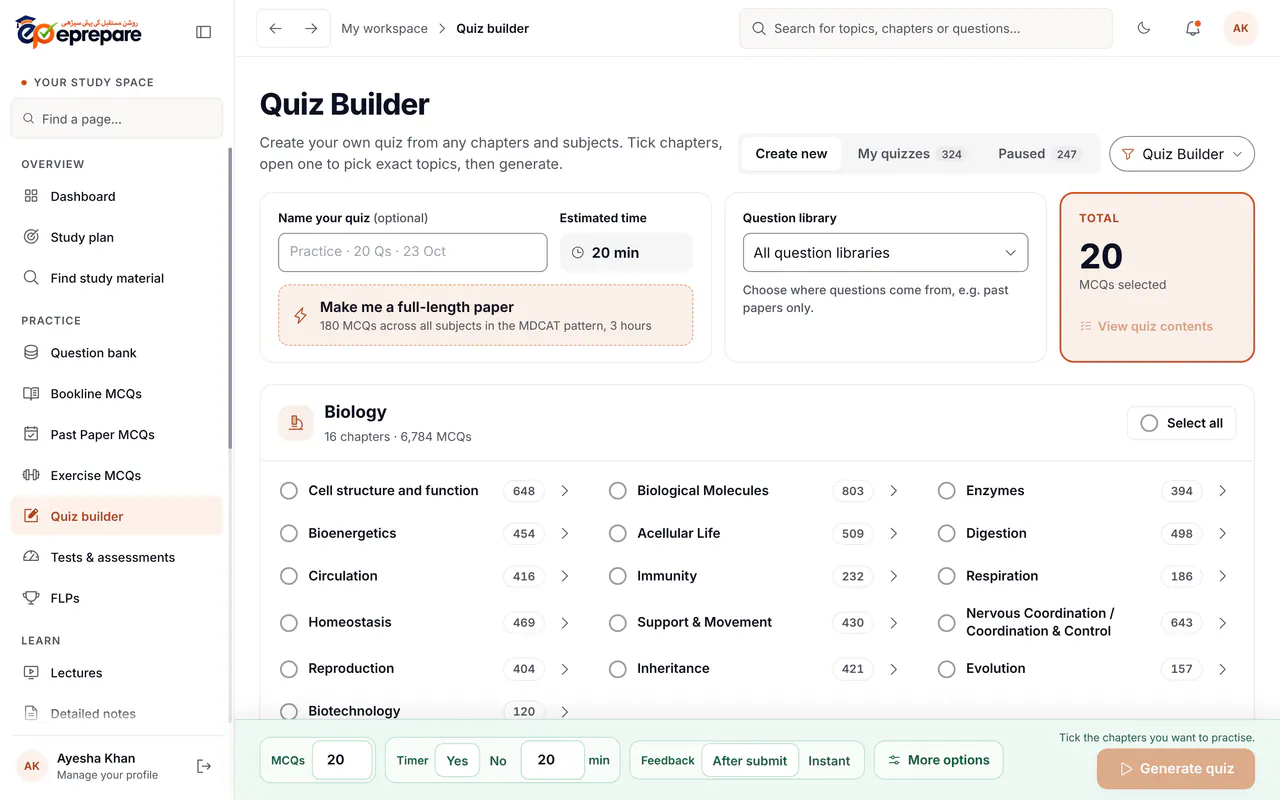
The Quiz Builder lets you make your own test. Tick any chapters and topics, choose where the questions come from (for example, past papers only), set the number of MCQs and the timer, and choose instant feedback or feedback at the end, like the real exam. Every quiz is saved, so you can pause and continue later. In the Advance package, one tap builds a full-length paper of 180 MCQs across all subjects in the MDCAT pattern.
How it helps: you decide exactly what to practise today: the chapter you just studied, a mix of weak topics, or a full paper on a weekend. No two students need the same test, and the Quiz Builder means you never have to settle for one.
Learn: lectures, notes and flashcards
Video lectures and MCQ video discussions
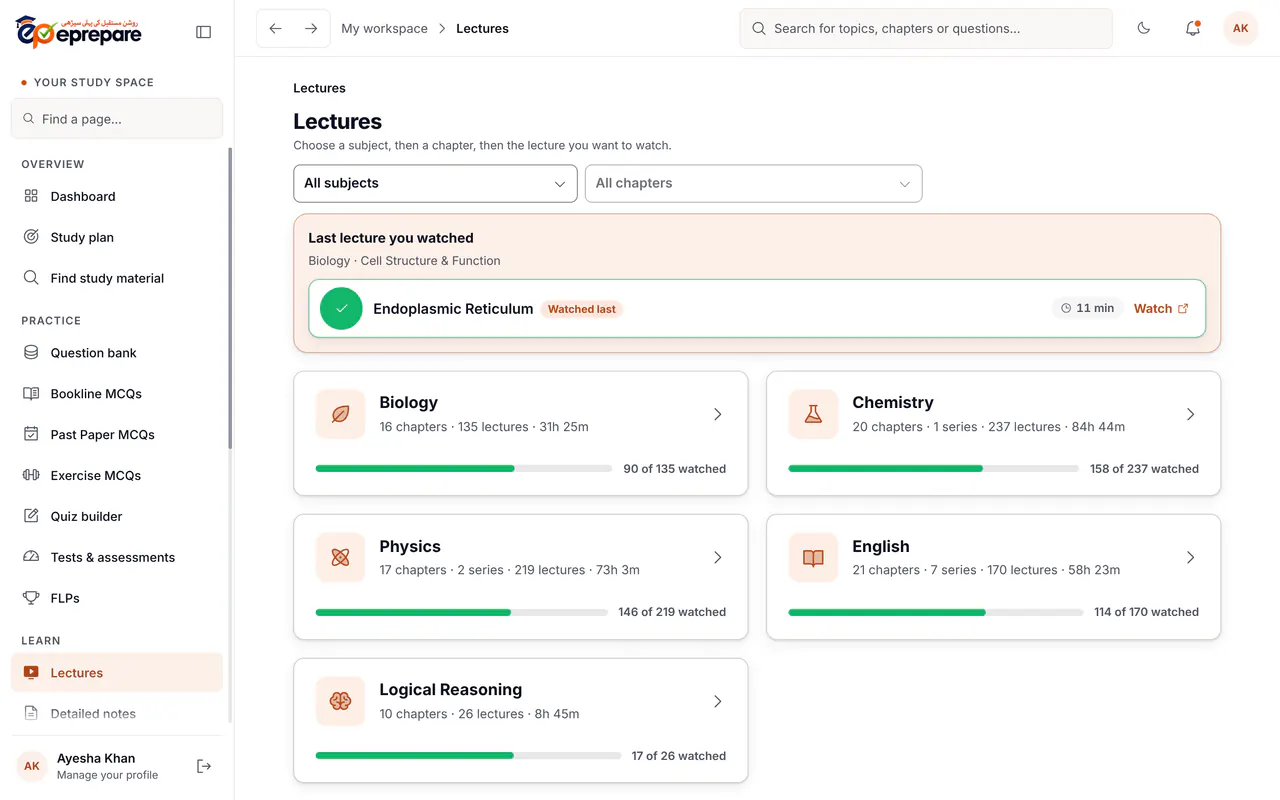
There are 787 lectures across all five subjects, chapter by chapter. The app remembers where you stopped, so you continue the last lecture in one tap, and it shows how much of each subject you have watched. The MCQ video discussion series has teachers working through MCQs on video, so you can see the reasoning, not just the answer. Lectures and the discussion series come with the Plus, Pro and Advance packages.
How it helps: a concept explained well once saves hours of rereading. Watching a teacher solve MCQs also shows you how to approach the tricky ones in the exam.
Detailed notes, quick revision notes and slides
Every subject has detailed chapter-wise notes, plus short quick-revision notes for the last weeks before the exam, and slides you can read on your phone.
How it helps: detailed notes are for learning a chapter properly the first time; quick-revision notes are for going over many chapters fast when the exam is close. Having both means you always have the right material for the stage you are in.
Flashcards that come back before you forget
There are 6,700 flashcards, and the 2027 decks cover a chapter in about 20 minutes. Spaced repetition brings each card back just before you would forget it. You can keep your own personal deck for formulas and numerical values, and turn any MCQ into a flashcard.
How it helps: MDCAT rewards facts you can recall instantly. Short, regular flashcard sessions keep hundreds of facts fresh without long rereading sessions.
Test yourself like the real exam
Chapter tests and weekly tests
Test a whole chapter or hand-picked topics whenever you finish studying them, and take weekly tests and test series from Tests & assessments. Every attempt is kept in Previous attempts with its review.
How it helps: testing yourself straight after studying shows what actually stuck, while you still have time to fix it.
The FLP series
Full-length papers follow the MDCAT pattern: 180 MCQs across all subjects in three hours. The timer keeps running correctly through a refresh or a dropped connection, and after each paper you see your rank and percentile among the students who sat it, with marks by subject. The FLP series comes with the Advance package.
How it helps: three hours of focus is a skill of its own. Sitting full papers before the exam builds your speed and stamina, shows which subject costs you the most marks, and takes away the shock of the real paper.
Plan and track: always know what to do next
Study plan
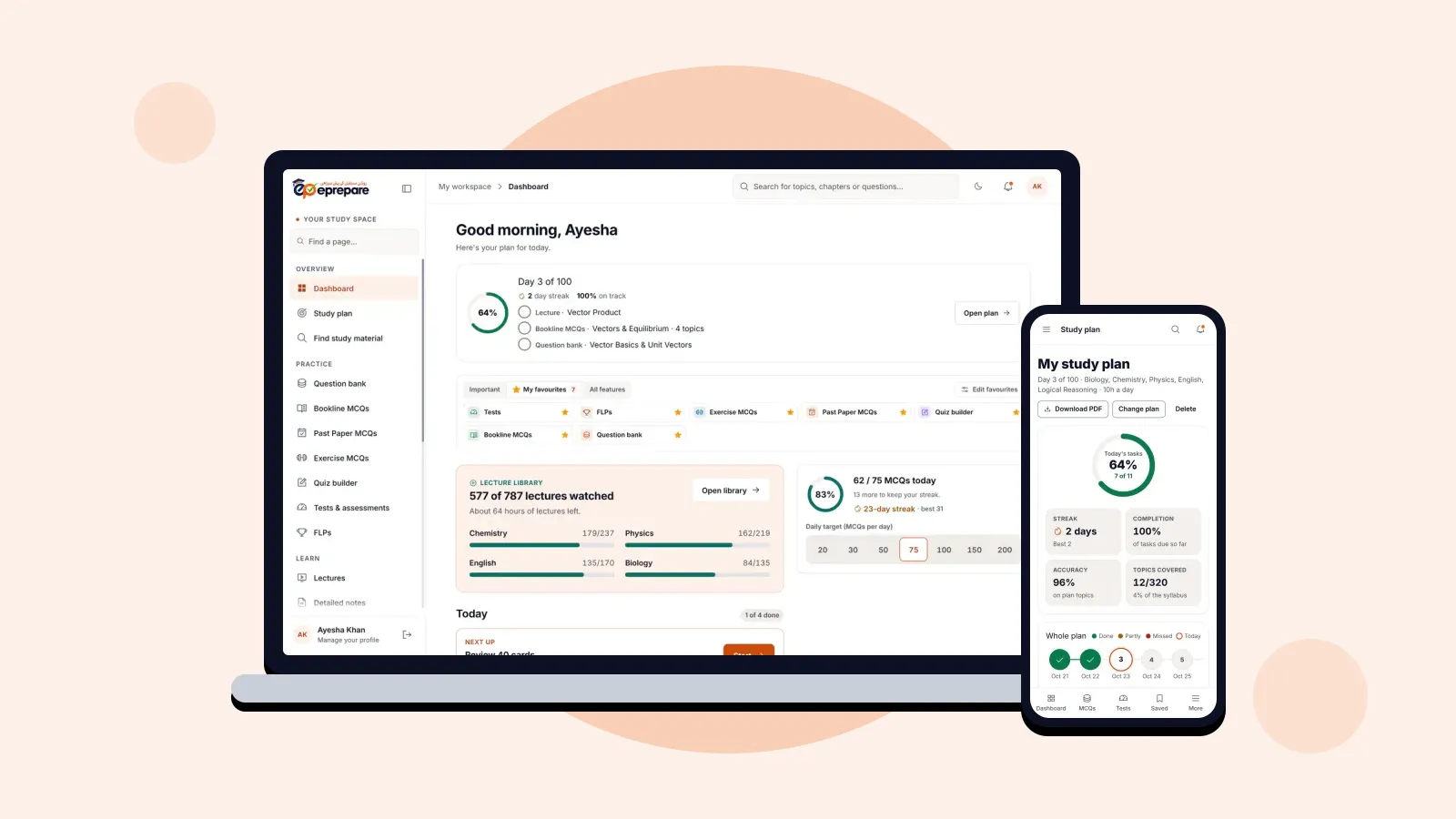
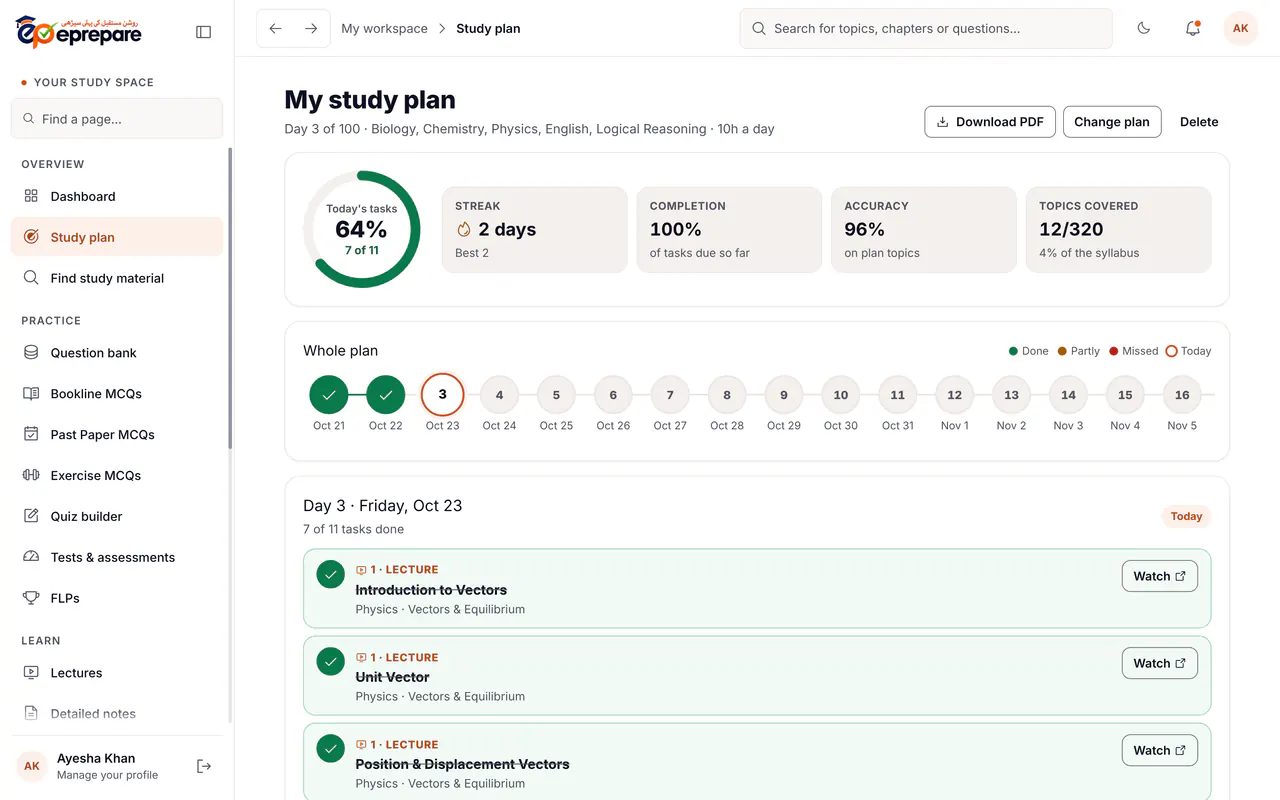
Set your exam date and how many hours you can study each day, and the app builds a day-by-day plan of lectures, Bookline MCQs, past papers and weekly tests until the exam. Missed a day? Move it forward in one tap and the plan reschedules itself. You can also download the plan as a PDF.
How it helps: the hardest part of preparation is often deciding what to do today. The plan answers that every morning and makes sure the whole syllabus is covered before exam day, not just the chapters you like.
Score predictor
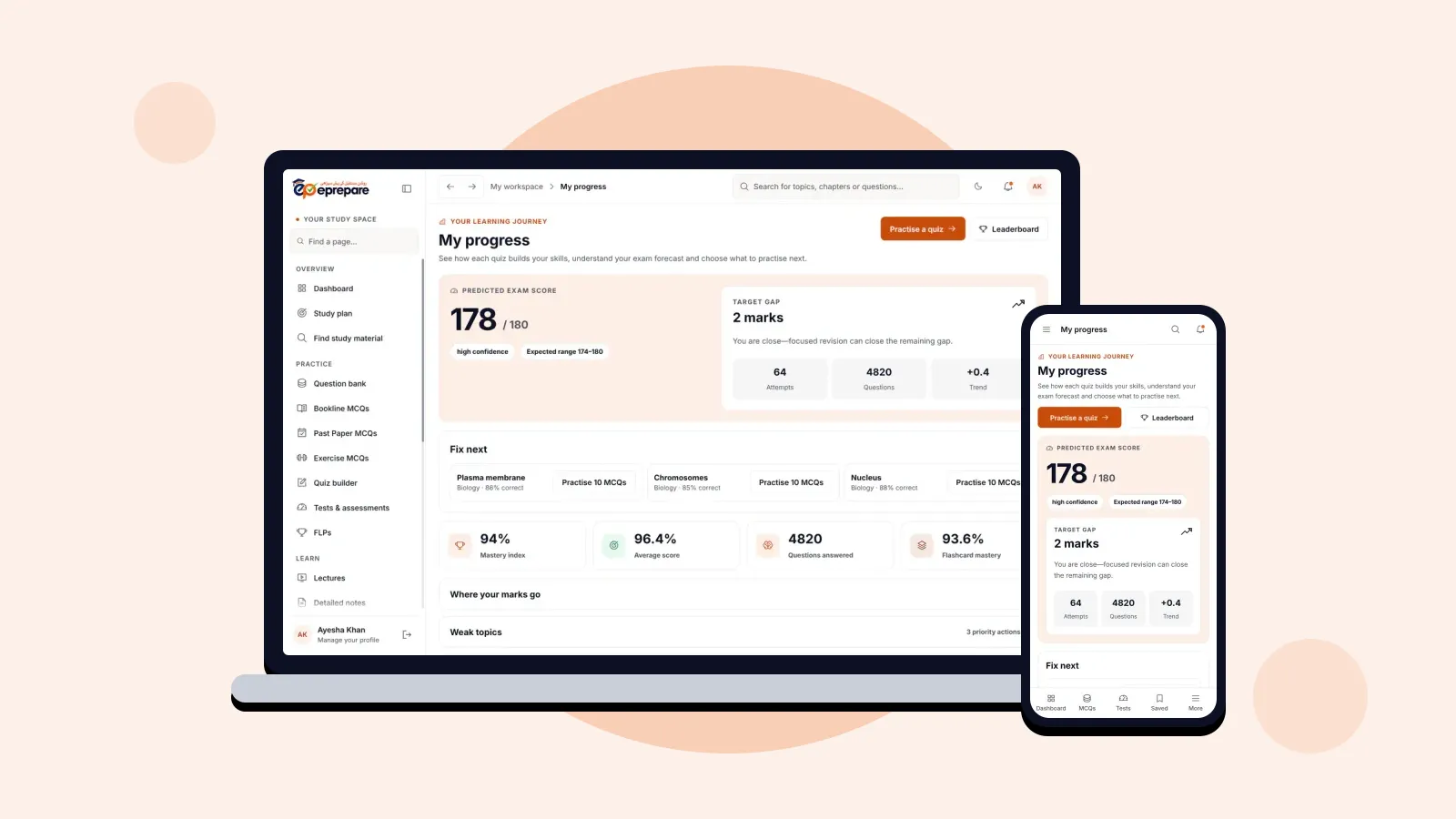
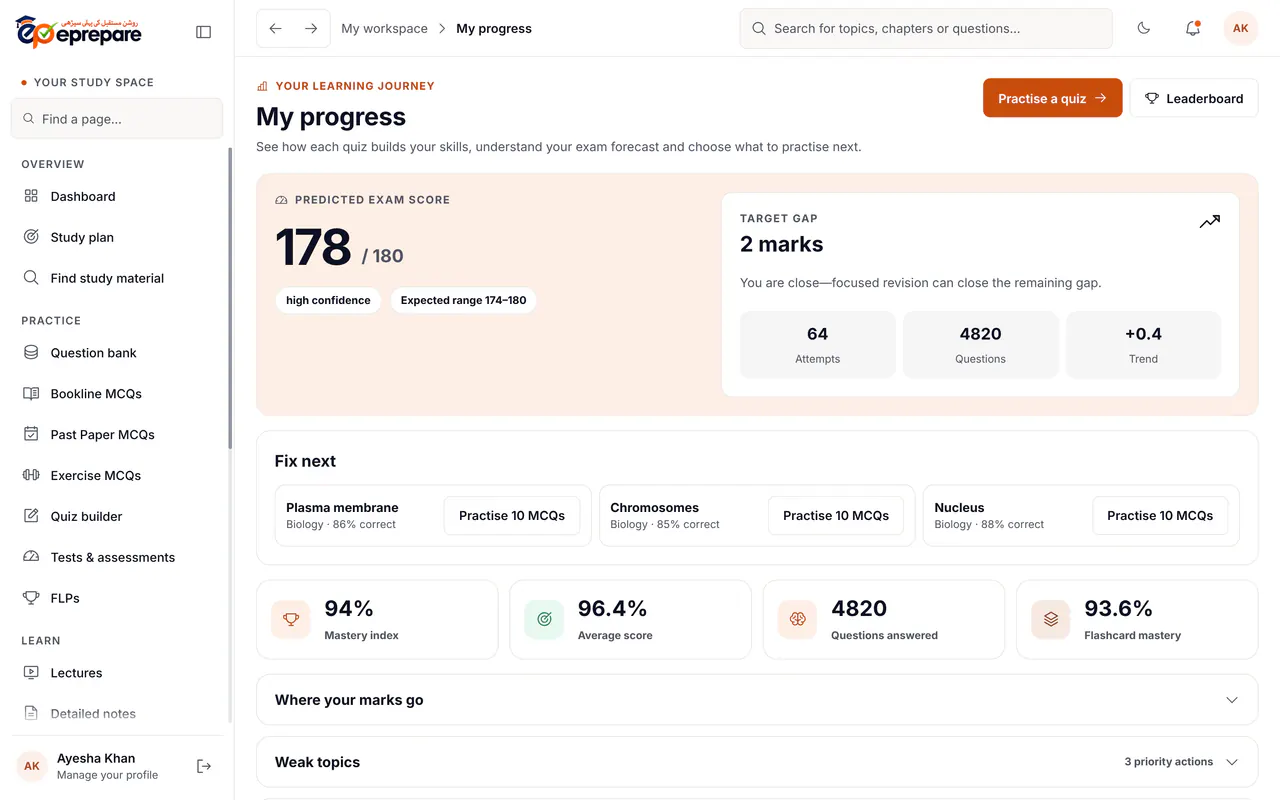
Every quiz you take sharpens a predicted MDCAT score out of 180, shown with a range, your gap to the target you set, and a "Fix next" list of the topics worth the most marks.
How it helps: instead of guessing whether you are ready, you see an estimate that moves as you practise, and you know which topics will raise it fastest.
Syllabus map
All 98 chapters appear on one screen, each coloured green, amber or red by your accuracy, with a bar for how much of it you have practised. One tap takes you from a weak chapter straight to practice.
How it helps: weak chapters stop hiding. You see at a glance where you are strong, where you are not, and what you have not touched yet.
Wrong MCQs and smart revision
Every question you get wrong is saved automatically. Smart revision brings back the ones due today and keeps returning the ones you keep missing until you get them right. You can filter by subject, chapter and topic, and tag why you missed a question.
How it helps: your own mistakes are the most valuable revision list you have. Going back over them until they are fixed turns lost marks into marks you will not lose again.
Saved MCQs
Bookmark any question and keep it in folders, for example "formulas" or "tricky Biology", to revise later.
How it helps: the best questions you meet do not get lost in thousands of others.
Leaderboard
Weekly, monthly and three-month rankings, by accuracy and by number of MCQs practised, show how you compare with students across Pakistan. It is fair, because you need a minimum number of answers to be ranked by accuracy (10 in a week, 20 in a month, 30 over three months), and private, because it shows only your first name and last initial, and you can hide your name from others in one tap.
How it helps: a little competition keeps motivation up on the days when studying feels slow, and you can see how far the next rank is.
Help when you are stuck
Send a doubt to a mentor privately, with a photo of the question or a voice note, and get it solved. Sir Fahad's team of mentors also keeps students on a daily task until MDCAT. The community is a place to discuss with other students.
How it helps: one unsolved doubt can block a whole chapter. Getting an answer quickly keeps you moving, and a mentor checking in keeps you consistent.
Study anywhere, on any device
ePrepare works on Android phones, iPhones and laptops, and your progress stays in one account, so you can watch a lecture on the laptop and revise flashcards on the phone later. There is a dark mode for late-night study.
Which package includes which feature
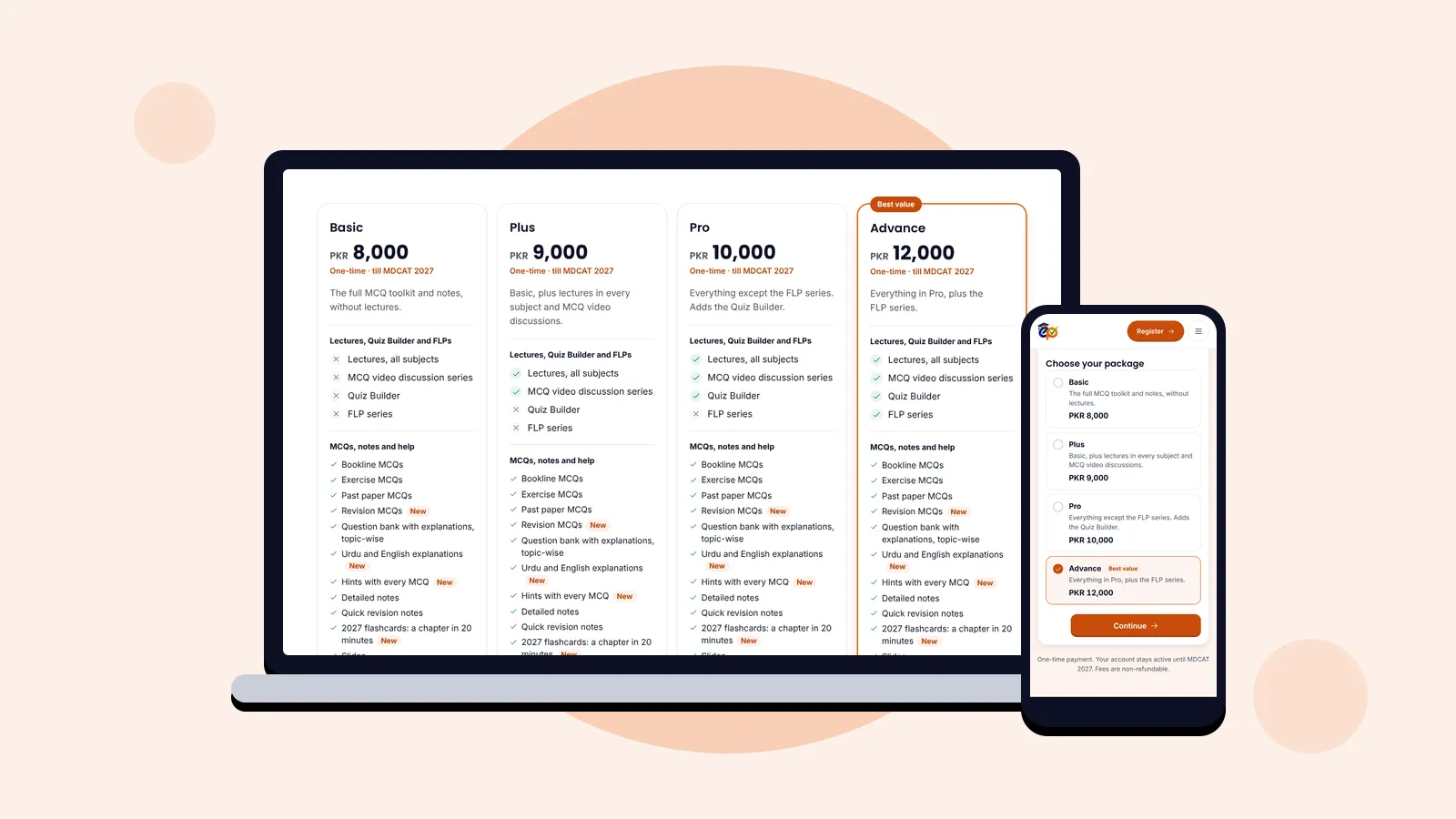
Every package is a one-time fee, valid until MDCAT 2027, and every package includes the full MCQ toolkit, the notes and all the planning and tracking tools. The packages differ only in lectures, the Quiz Builder and the FLP series.
| Feature | Basic PKR 8,000 | Plus PKR 9,000 | Pro PKR 10,000 | Advance PKR 12,000 |
|---|---|---|---|---|
| MCQ toolkit, notes, flashcards, study plan, score predictor, mentors | Yes | Yes | Yes | Yes |
| Video lectures and MCQ video discussions | No | Yes | Yes | Yes |
| Quiz Builder | No | No | Yes | Yes |
| FLP series and one-tap full-length paper | No | No | No | Yes |
See every feature side by side on the packages page.
See the app in action
This short tour shows the dashboard, practice and progress screens as a student sees them.
How to start
- Choose a package. Basic, Plus, Pro or Advance. If you are not sure, ask us on WhatsApp at 0341 4874938.
- Pay once by EasyPaisa, JazzCash, NayaPay, SadaPay or bank transfer.
- Register and upload the payment screenshot. Once the payment is verified, your username and password arrive on WhatsApp and by email.
- Make your study plan on the first day, and follow it.
Want to see the results first? Meet our MDCAT 2026 toppers, or read what students say in their Google reviews.