


"What will I actually get in MDCAT?" Every student asks it, usually late at night after a bad test. Guessing from one paper is misleading: one great test makes you overconfident, one bad test makes you panic. What you need is a forecast built from all your practice, with an honest margin of error, and a clear answer to the next question: what should I do about it?
That is what the predicted exam score and Fix next on ePrepare's My progress page give you. This guide explains how the prediction is worked out, what "confidence" and "expected range" really mean, how to read your target gap, and how to turn Fix next into marks, step by step.
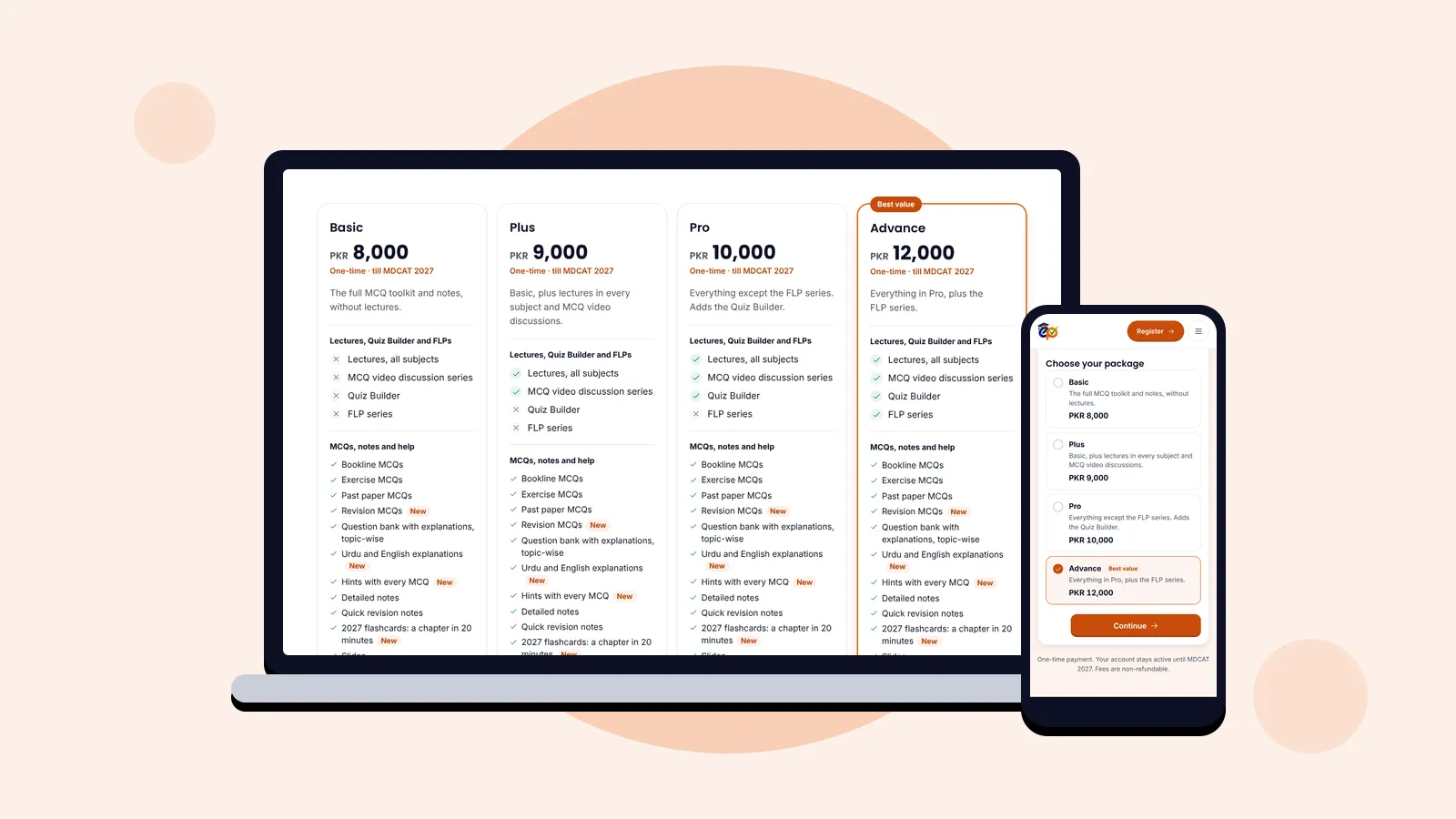
Who can use it: the score predictor, Fix next and progress analytics are part of every ePrepare package. Compare the packages.
Where to find your predicted score
Open My progress from the menu, or tap the predicted score card on your dashboard. The forecast sits at the top of the page, followed by Fix next and the detailed reports.
The prediction appears after your first finished test. Every test and practice session you complete counts: Quiz Builder tests, Bookline, past-paper and question bank practice, smart revision, recovery quizzes and FLPs.
Reading the forecast, box by box
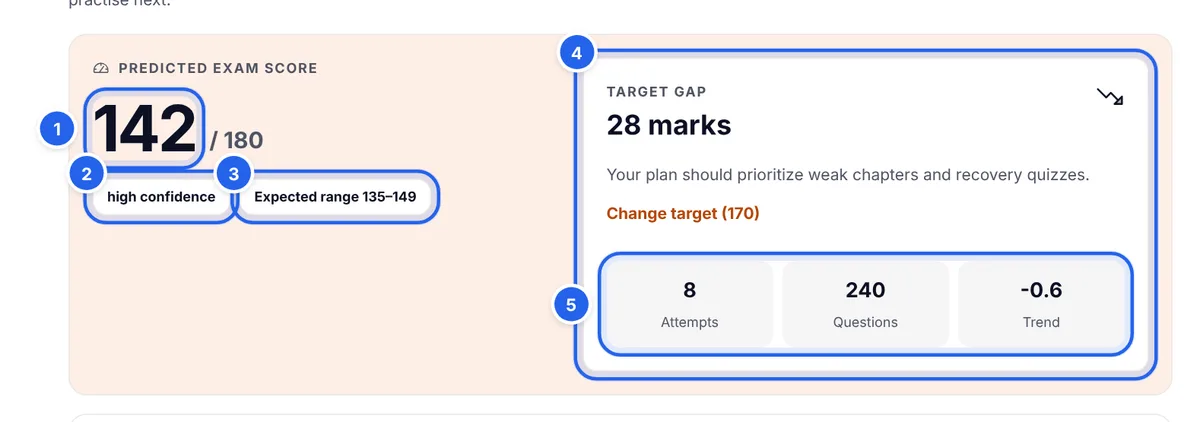
- Predicted score (1): your likely MDCAT score out of 180 if you sat the exam today.
- Confidence (2): how much evidence the forecast has. More tests and more questions mean higher confidence.
- Expected range (3): where your real score is likely to fall. A narrow range means the forecast is steady; a wide one means you need more practice before trusting the number.
- Target gap (4): how many marks stand between your forecast and the target score you set, with a short message on what to focus on and a link to set or change your target.
- Attempts, Questions and Trend (5): the evidence. Trend shows whether your scores are rising or falling, in percentage points per test. In the example, −0.6 means scores have slipped slightly over recent tests.
How the prediction is worked out
There is no magic in the number, and knowing how it works helps you trust it and use it well.
- Every finished test counts, recent tests count more. The forecast is a weighted average of your test scores, where each newer test carries more weight than the one before. Your score from last week matters more than your score from two months ago, because you have improved since then.
- Your trend nudges it. Once you have three or more tests, ePrepare measures whether your scores are climbing or dropping and adjusts the forecast slightly in that direction.
- Skipped questions count as lost marks, just like in the real exam. That is why your predicted score can sit a little below your accuracy.
- It is scaled to the MDCAT paper: 180 MCQs, one mark each.
What confidence and the expected range mean
| Confidence | Evidence needed | Expected range |
|---|---|---|
| High | 8 or more tests and 150 or more questions | About ±7 marks |
| Medium | 3 or more tests and 40 or more questions | About ±14 marks |
| Low | Less than that | About ±25 marks |
Tip: a low-confidence forecast is not bad news, it is just early. Finish a few more tests across different subjects and the range tightens quickly.
Set your target score
The target gap only works once you tell ePrepare what you are aiming for. In the Target gap box, press Set target score (or Change target if you set one before). On the Exam goal page, enter your target score (6) out of 180 and your exam date, then press Update goal (Save goal and continue the first time).
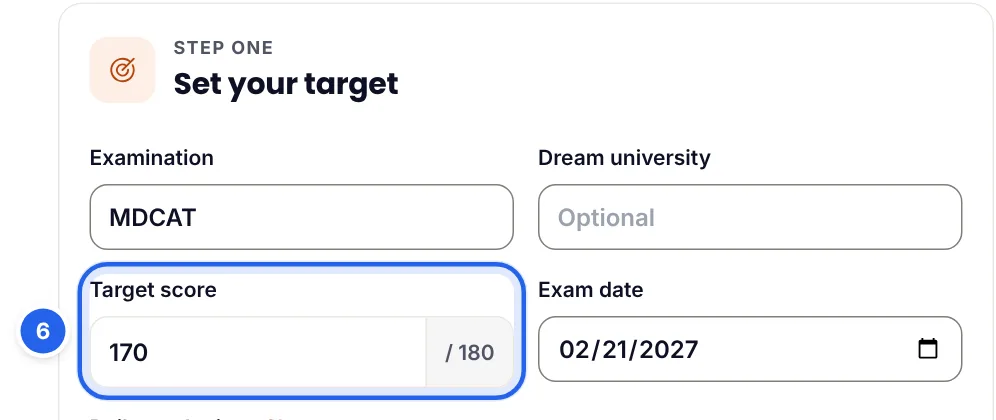
Choose a target that matches the merit you need for the college you want, not just a round number. The target gap then tells you where you stand:
- Target reached: your forecast is at or above your target. Keep your level steady with revision and full papers.
- Close (10 marks or fewer): focused revision on weak topics can close the gap.
- More than 10 marks: prioritise weak chapters and recovery quizzes; Fix next shows where to start.
Fix next: the three topics to practise first
A predicted score tells you where you are. Fix next tells you what to do next. It shows the three topics that are costing you the most marks right now.
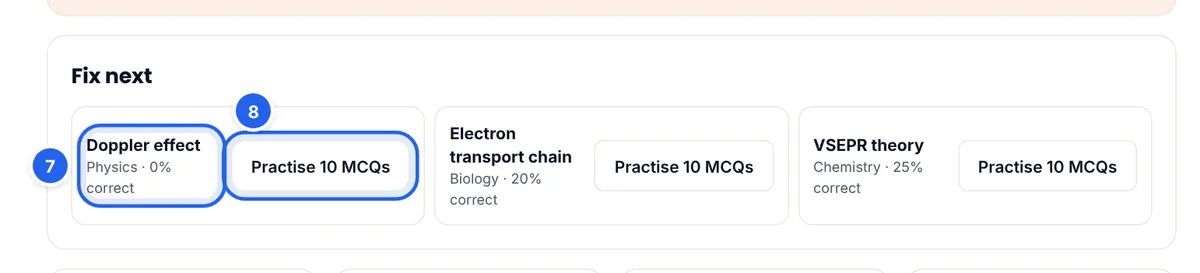
Each topic shows its subject and how often you answer it correctly (7). ePrepare ranks topics by marks lost: how many questions you have answered on the topic multiplied by how often you got them wrong. Topics where you already score 80% or more are left out, so the list always points at real gaps, not at topics you have nearly mastered.
Press Practise 10 MCQs (8) to start a 10-question practice set on that topic straight away. Do the first topic today, the second tomorrow, the third the day after, then check how the list has changed.
Why it works: a topic you answer correctly only one time in five is worth far more practice than a topic you already get right four times in five. Fix next keeps you working where each hour of study adds the most marks.
Where your marks go: the subject breakdown
Expand Where your marks go to see your predicted score split across the MDCAT subjects, using the paper's pattern: Biology 81 marks, Chemistry 45, Physics 36, English 9 and Logical Reasoning 9.
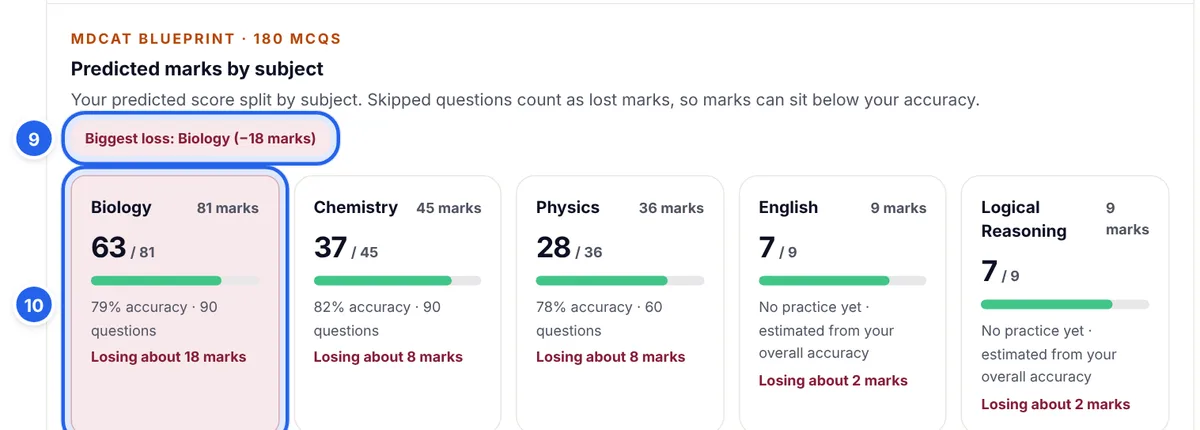
- Biggest loss (9) names the subject costing you the most marks.
- Each subject card (10) shows your predicted marks out of that subject's total, your accuracy, how many questions you have answered and about how many marks you are losing.
Notice that Biology can lose the most marks even with good accuracy, simply because it carries 81 of the 180 marks. A few points of accuracy in Biology are worth more than the same improvement in English. Subjects you have not practised yet are estimated from your overall accuracy and labelled as estimates, so practise them to replace the guess with real evidence.
Your recovery roadmap for weak topics
Expand Weak topics for a personal plan for each priority topic.
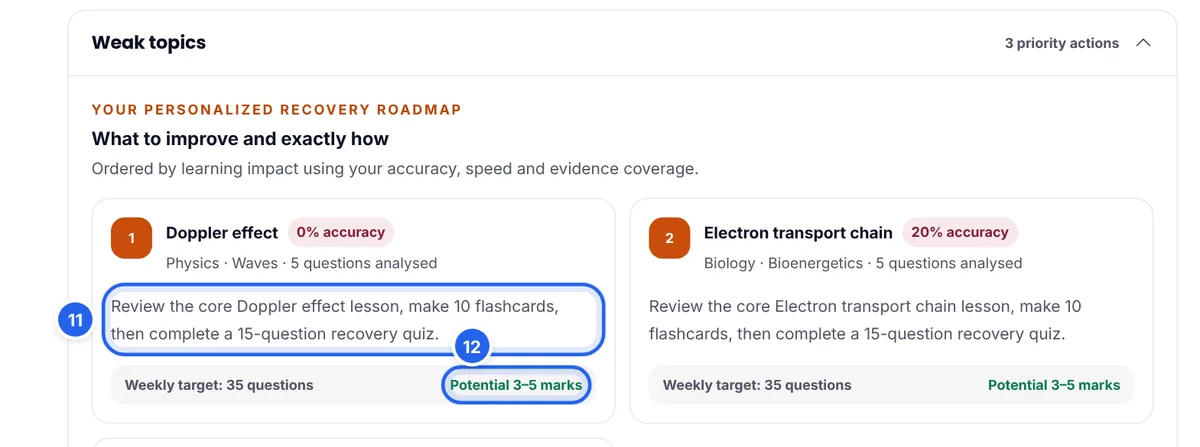
Each topic comes with a specific action (11), a weekly question target and the marks it could be worth (12). The action depends on why the topic is weak:
| Situation | What ePrepare suggests | Potential |
|---|---|---|
| Accuracy below 45% (a concept gap) | Review the core lesson, make 10 flashcards, then a 15-question recovery quiz. 35 questions a week. | 3–5 marks |
| Slow answers, over 75 seconds on average | Two timed 10-question drills, then review every answer that took over 75 seconds. 25 questions a week. | 1–3 marks |
| Inconsistent accuracy | Review your wrong answers, write one rule for each mistake, then retest after 24 hours. 25 questions a week. | 1–3 marks |
Below it, Priority weaknesses lists up to eight weak topics, lowest accuracy first, with a button to practise them together.
Watch your scores move
Expand Quiz score progression to see your latest 12 tests as a simple chart. Look at the shape, not single bars: a steady climb means your routine is working; a flat line means it is time to change something; a drop after a run of good scores often means you have moved on to harder chapters, which is normal.
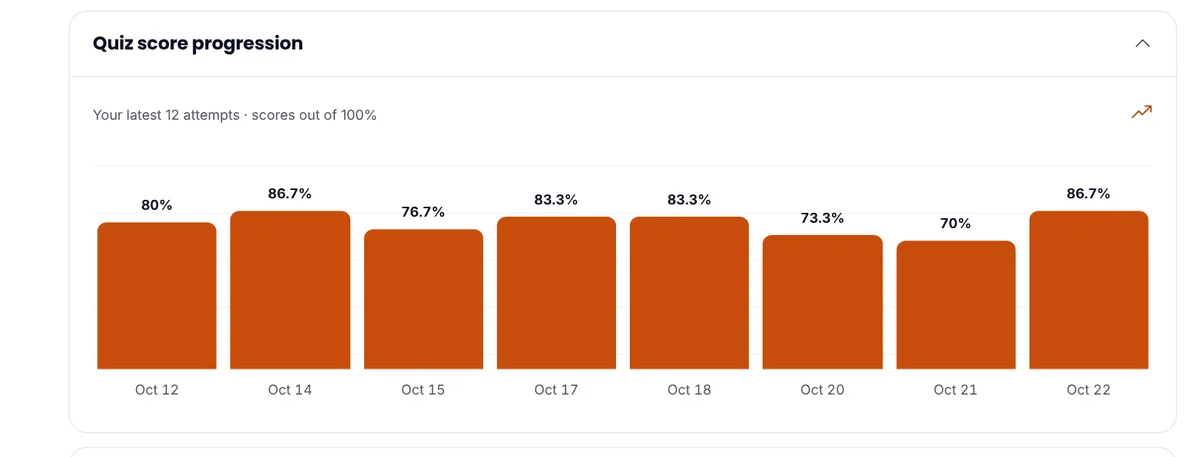
The same page also compares your accuracy with the top 10% and the average of ePrepare students (You vs the top 10%), shows Why you lose marks from the reasons you tag on your mistakes, and suggests what to practise next.
Check it on your phone
My progress works the same on a phone. A quick look after each test is enough to see whether your forecast moved and what Fix next wants from you today.

A weekly routine that raises your forecast
- Every day: practise one Fix next topic with Practise 10 MCQs, and finish your smart revision set.
- Every few days: take a mixed test across subjects, so the forecast reflects your whole syllabus, not just your favourite chapters.
- Once a week: open My progress, compare the forecast and trend with last week, read Where your marks go, and follow the roadmap for your top weak topic.
- Every one to two weeks: sit a full-length paper. It is the closest thing to the real exam and moves the forecast the most honestly.
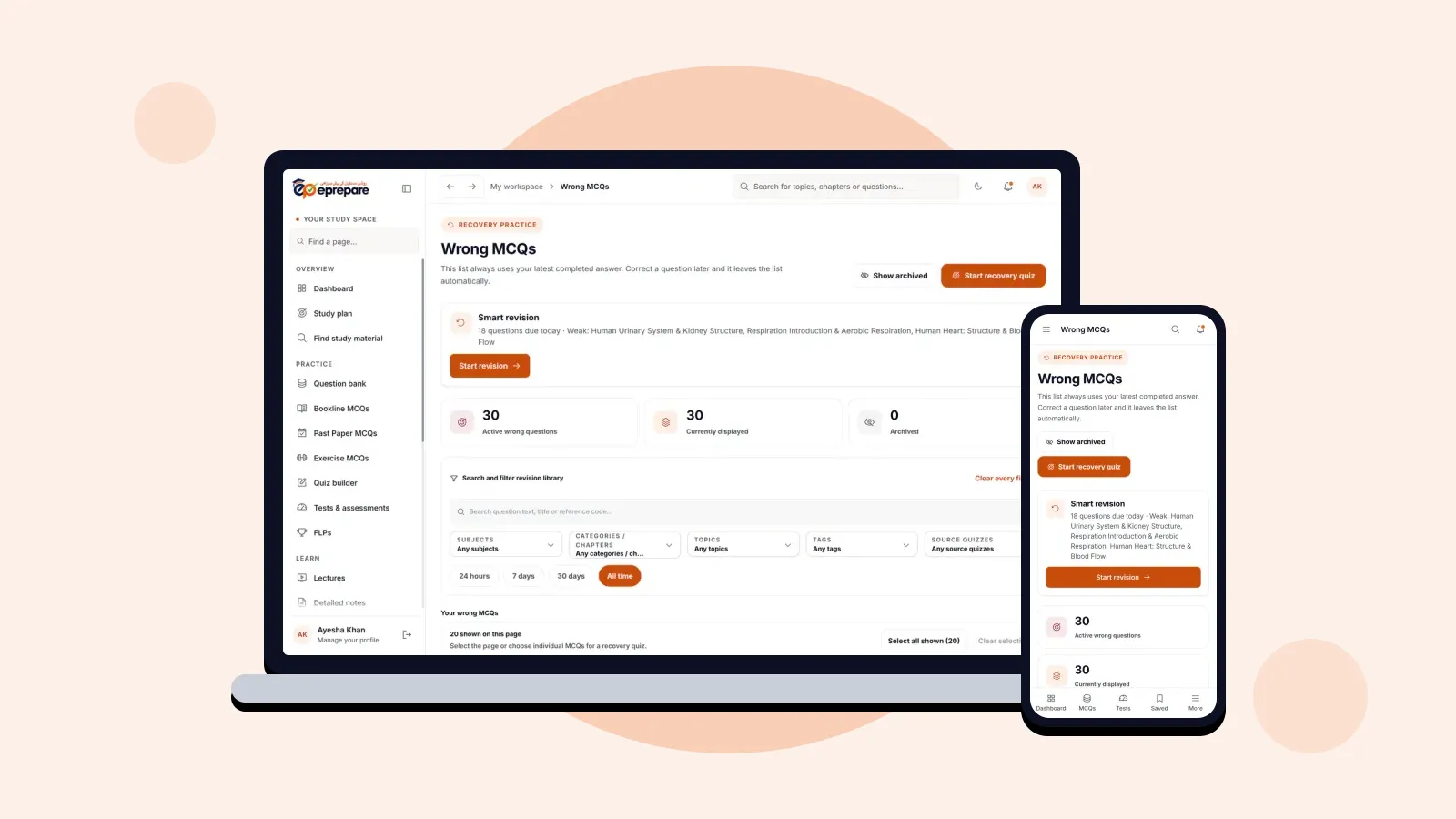
Pair this with your study plan, and revise every mistake with Wrong MCQs and smart revision.
Common mistakes to avoid
- Chasing the number with easy tests. Practising only chapters you know makes the forecast look good and helps nobody. Test your weak chapters too.
- Panicking over one low score. One test is one data point. Watch the trend over several tests.
- Ignoring the range. "142" with a range of 135–149 means anything in that band is realistic. Plan for the lower end.
- Never setting a target. Without a target there is no gap to close, and it is harder to stay motivated.
- Skipping questions in practice. Skipped questions count as lost marks in the forecast, just as in the exam. Practise answering every question.
Frequently asked questions
How accurate is the predicted MDCAT score?
It is an estimate from your own practice, not a guarantee. With high confidence (8 or more tests and 150 or more questions) your score is likely to fall within about 7 marks either side of the forecast, if the exam is similar in difficulty to your practice.
Which tests count towards the prediction?
Every test and practice session you finish: Quiz Builder tests, Bookline, past-paper and question bank practice, smart revision, recovery quizzes and FLPs. Recent tests count more than older ones.
Why is my predicted score lower than my accuracy?
Skipped questions count as lost marks, the same as in the real exam. Answer every question in practice and the two numbers move closer together.
How do I set or change my target score?
Open My progress and press Set target score or Change target in the Target gap box. Enter your target out of 180 and save it.
How does Fix next choose topics?
It picks the three topics where you lose the most marks, based on how many questions you have answered on each topic and how often you got them wrong. Topics where you already score 80% or more are skipped.
Is the score predictor in every package?
Yes. The predictor, Fix next and all progress analytics come with Basic, Plus, Pro and Advance.
Let the forecast guide you, not scare you
Your predicted score is a mirror, not a verdict. It shows where you stand today, and Fix next shows the shortest way up. Set your target, practise your first Fix next topic today, and check your forecast again at the end of the week. New to ePrepare? Register for MDCAT 2027, and read about every ePrepare feature and how it helps.