

FLP stands for full-length paper: a practice test with the same length and timing as the real MDCAT. Every academy says its FLPs are "like the real paper". This page shows exactly what the ePrepare FLP Series is, how its papers are built, what you see after you submit, and how to use FLPs in the last eight weeks so your score actually goes up.
We have written it from the app itself, not from a brochure. Where something depends on your account, such as how many papers are live right now, we tell you where to check it.
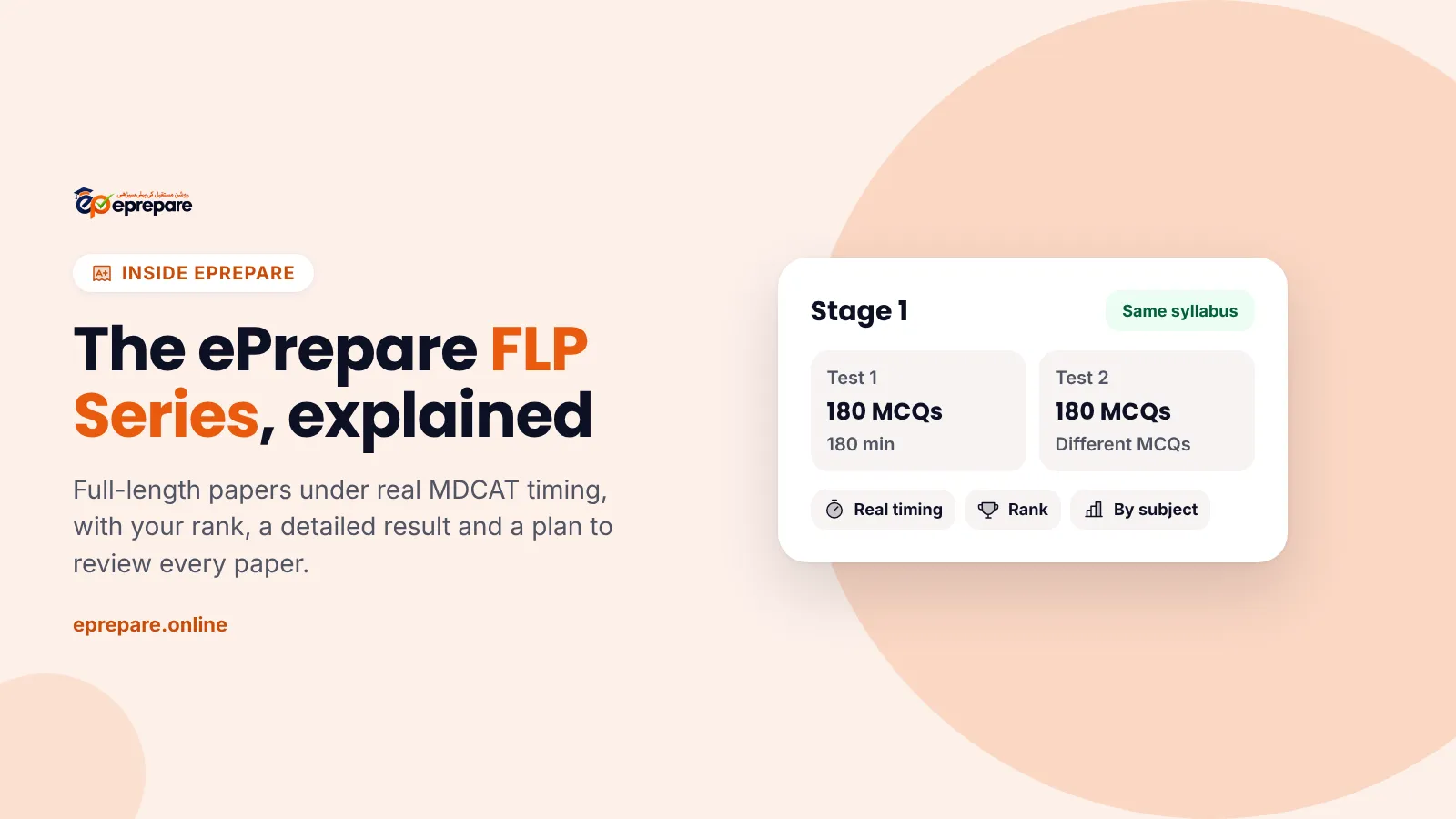
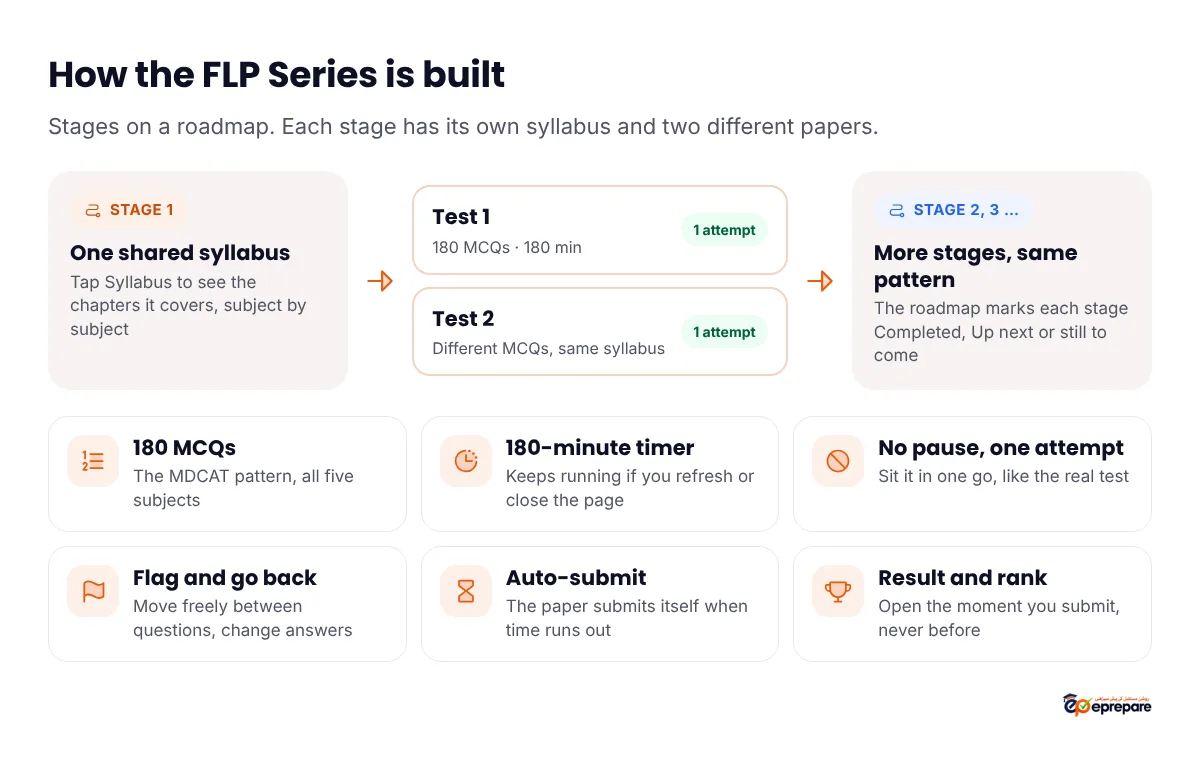
The short answer: the ePrepare FLP Series is a set of full-length MDCAT papers in the Advance package (PKR 12,000). Papers are grouped into stages. Each stage has its own syllabus and two different papers, Test 1 and Test 2. Every paper has 180 MCQs and a 180-minute timer, one attempt, no pause, and it submits itself when time runs out. Your score, rank, marks by subject and chapter, and the leaderboard open the moment you submit, and every wrong answer goes to your Wrong MCQs for revision. In the last 8 weeks, take one paper a week, then two a week in the final month, and review each one before the next.
What is the ePrepare FLP Series?
It is the full-length paper section of the ePrepare app, called FLPs in the menu. Each paper is a complete MDCAT-style test: 180 MCQs, all five subjects, one 3-hour sitting. You sit it on your phone, tablet or laptop, whenever you choose, and you see your result straight after.
FLPs do a job that chapter tests cannot. A chapter test checks whether you know one chapter. A full paper checks whether you can keep your focus for three hours, switch from Biology to Physics without losing speed, and still have time left for the questions you flagged. Our guide to MDCAT mock tests and FLPs covers that difference in detail; this page is about how ePrepare's own series works.
How many papers, and how the series is structured
The series is laid out as a roadmap of stages. Open FLPs and the top of the page tells you four numbers for your account: how many stages are live, how many tests that adds up to, the MCQs per test and the minutes per test. We do not print a fixed paper count here because that number is shown live in the app, and it is the one to trust.
Inside each stage:
- One shared syllabus. Tap Syllabus on a stage to see exactly which chapters it covers, listed subject by subject. Read it before you start, so you know what the paper tests.
- Two different papers. Test 1 and Test 2 cover the same syllabus with different MCQs. The roadmap sums it up as "Same syllabus, different MCQs, one attempt each".
- A clear status. Each stage shows Completed, Up next or how many of its tests you have done, and a progress ring shows your tests done, stages complete and your average percentage.
Why two papers on the same syllabus helps
Use Test 1 to find your gaps. Fix them for a few days. Then sit Test 2 on the same chapters with fresh MCQs. If your marks go up, the fix worked. If they do not, you know the problem is not the chapter but something else, such as speed or careless reading. That before-and-after check is hard to get from random papers.
How an ePrepare FLP mirrors the real MDCAT
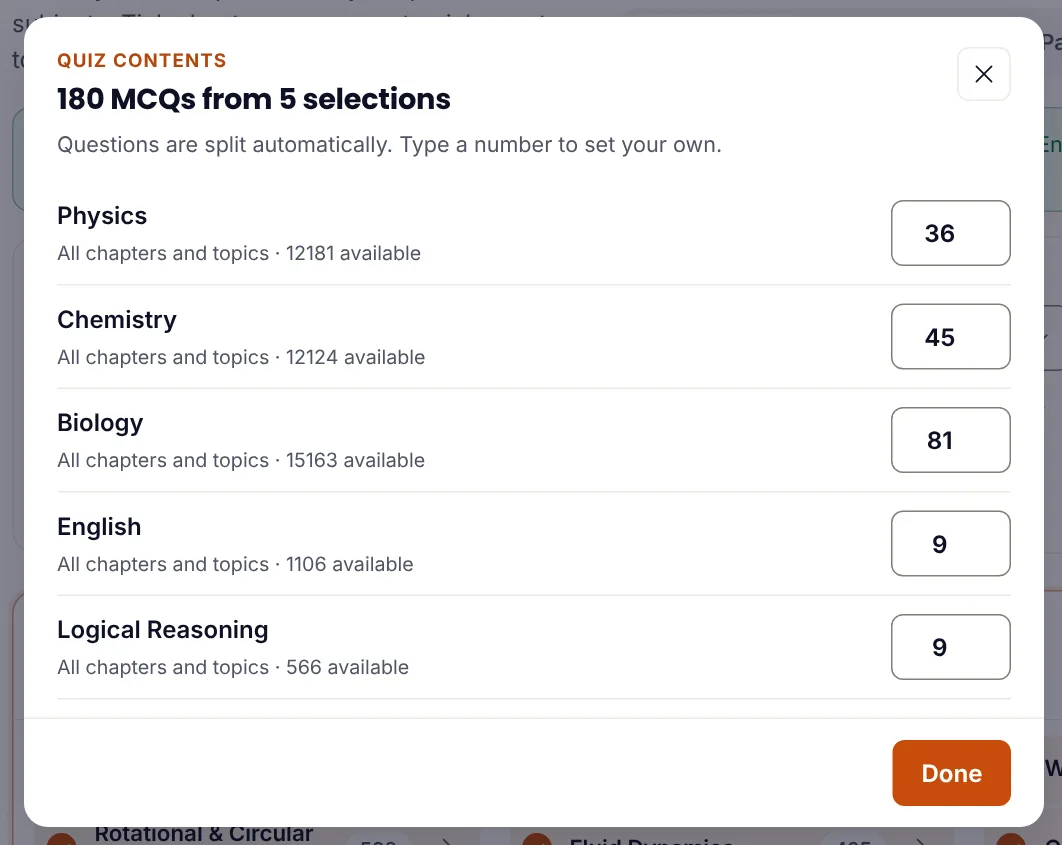
The Pakistan Medical and Dental Council (PM&DC) MDCAT is 180 MCQs in 3 hours: 81 Biology, 45 Chemistry, 36 Physics, 9 English and 9 Logical Reasoning, with no negative marking. See the full MDCAT paper pattern. Here is how an ePrepare FLP lines up with it.
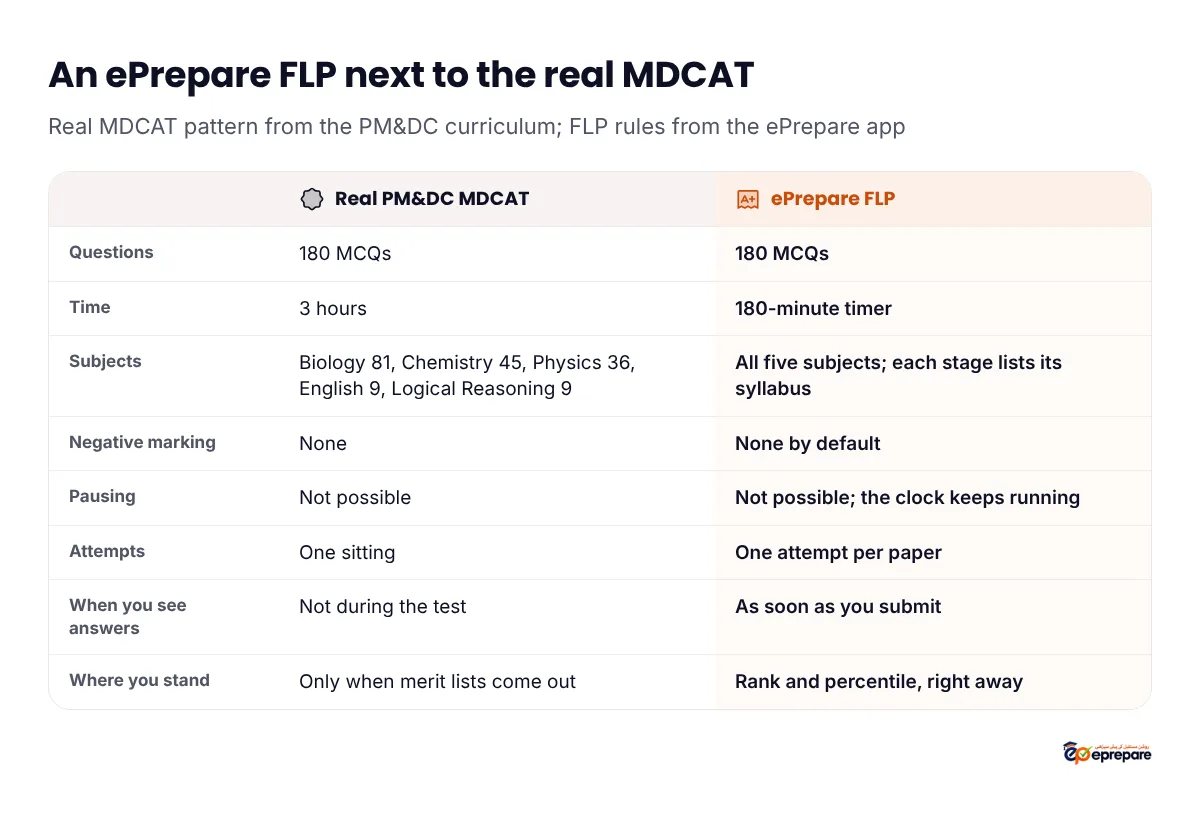
The rules every FLP follows, straight from the app:
- 180-minute timer that does not stop. It keeps running if you refresh, close the page or lose your connection. Your answers save automatically after every change, so a dropped signal does not wipe them, but the clock does not wait for you.
- No pause and one attempt per paper. You cannot pause and come back tomorrow, and you cannot retake the same paper. Pick a quiet three hours before you press Start test.
- Auto-submit. When time runs out, the paper submits itself with the answers you have saved.
- Answers stay hidden until you submit. There is no instant feedback during the paper, the same as the real test.
- Move freely. You can go back to any question, change an answer, and flag a question to come back to it. You can also submit early.
- No negative marking by default, matching the PM&DC MDCAT. A wrong answer and a blank both get zero, so never leave a question empty. Our guide on negative marking (minus marking) in MDCAT explains why guessing is always worth it.
- "How sure are you?" After you answer, you can tag it Sure, Not sure or Guessed. It is optional, and it pays off in the result (more on that below).
- No calculator in the paper. Practise your Physics and Chemistry numericals by hand.
What is different, and how to close the gap
The real test happens on one fixed day, in an exam hall, at a fixed time. An FLP happens wherever you are. That freedom is the only weak point, so make the conditions strict yourself: same time of day as your MDCAT slot, phone notifications off (or use a laptop), no notes, no breaks you would not get in the hall. Use the time plan from our MDCAT time management guide in every paper.
The FLP roadmap screen
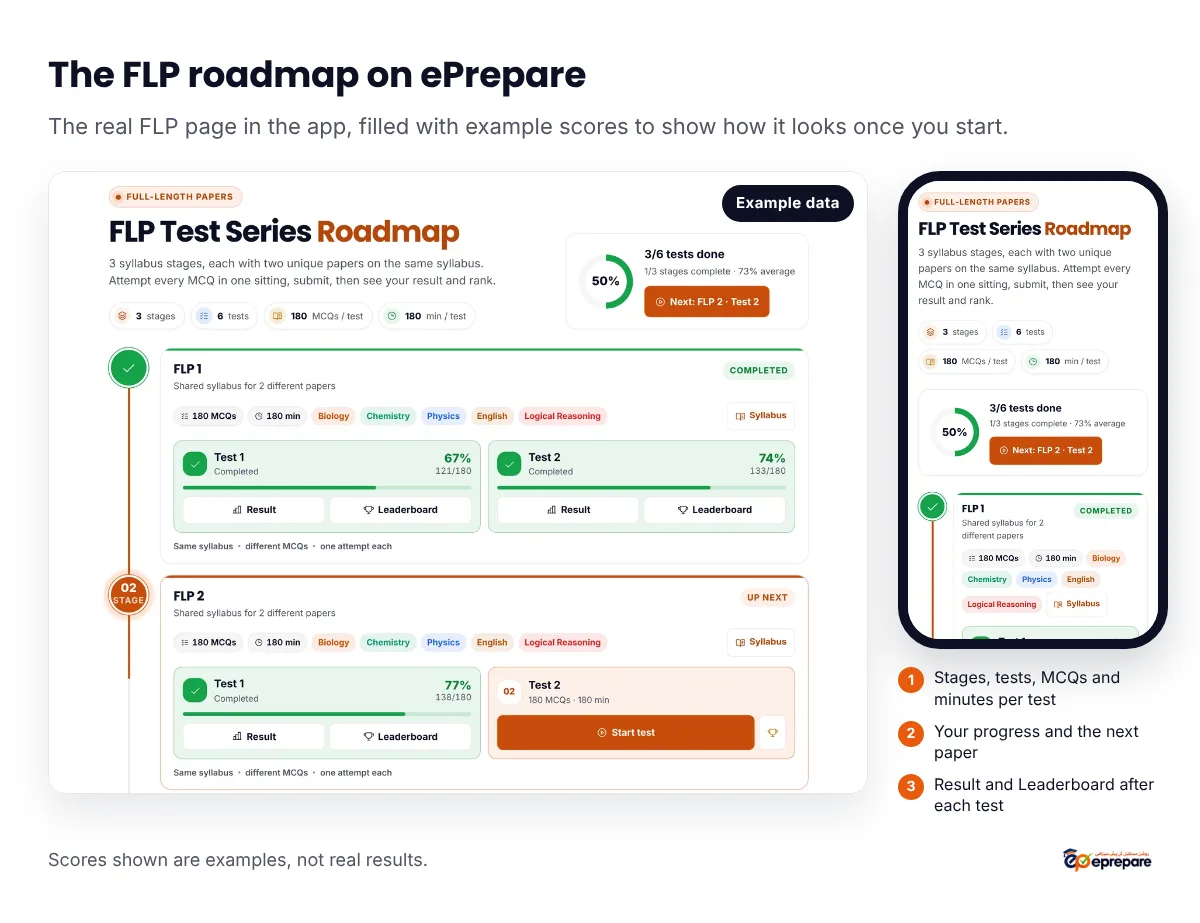
Each test card shows its MCQ count and time before you start, In progress if you have started it, and your percentage, marks and rank once you finish. Finished tests have two buttons, Result and Leaderboard. The big button in the progress card always takes you to the next paper you have not done.
On Basic, Plus or Pro, you can still open FLPs, browse every stage and read each syllabus, but the papers stay locked until FLP access is added to your account.
How results and analysis work
Results, answers and the leaderboard open right after you submit. This is what the result screen shows:
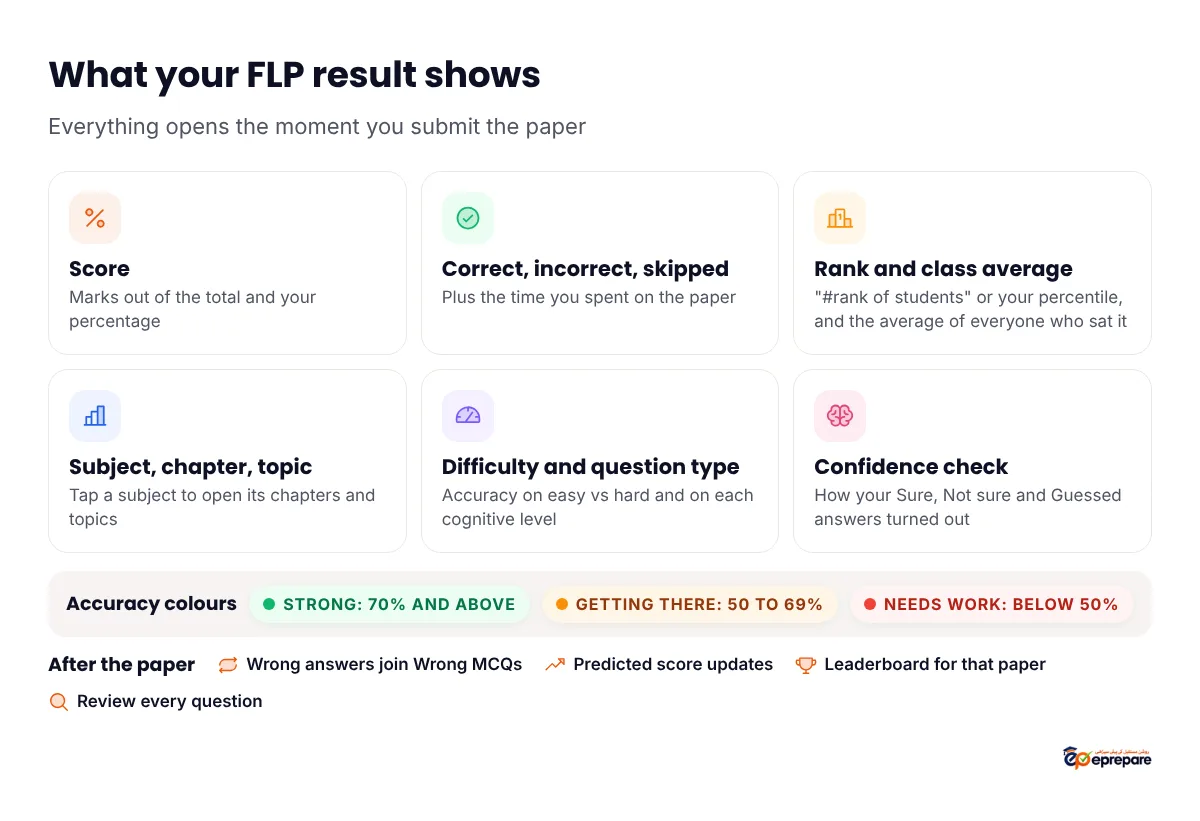
- Score and counts. Your marks and percentage, how many you got correct, incorrect and skipped, and how long you took.
- Rank and class average. Your position among the students who sat the same paper, shown as "#rank of total" or as a percentile, plus everyone's average. When two students tie, the one with fewer wrong answers ranks higher, then the one who took less time, then the one who submitted first.
- Performance by subject, chapter and topic. One list you can open level by level. Each row is coloured by accuracy: Strong (70% and above), Getting there (50 to 69%) or Needs work (below 50%), and the weakest rows come first.
- Difficulty and question type. Your accuracy on easy, moderate and hard MCQs, and on each cognitive level. If you lose most marks on easy questions, the problem is carelessness, not knowledge.
- Strong areas and Needs attention. A short list of each, so you know what to leave alone and what to fix first.
- Confidence check. How your Sure, Not sure and Guessed answers turned out. Answers you were sure of but got wrong are the most dangerous mistakes, because you would not think to revise them.
- Review answers. Go through the paper question by question with the correct answers.
The result also feeds the rest of the app. Every wrong answer joins Wrong MCQs, where smart revision brings it back on a schedule (see turning every mistake into marks). Your predicted MDCAT score updates with each paper (see how the predicted score works). And the syllabus map counts your FLP answers when it colours each chapter by accuracy.
How to take FLPs in the last 8 weeks before MDCAT
The plan below follows the same rhythm as our mock tests guide: one paper a week until the final month, then two a week, with the last paper 3 to 4 days before the test. Over eight weeks that is about 11 papers, and every one gets a proper review.
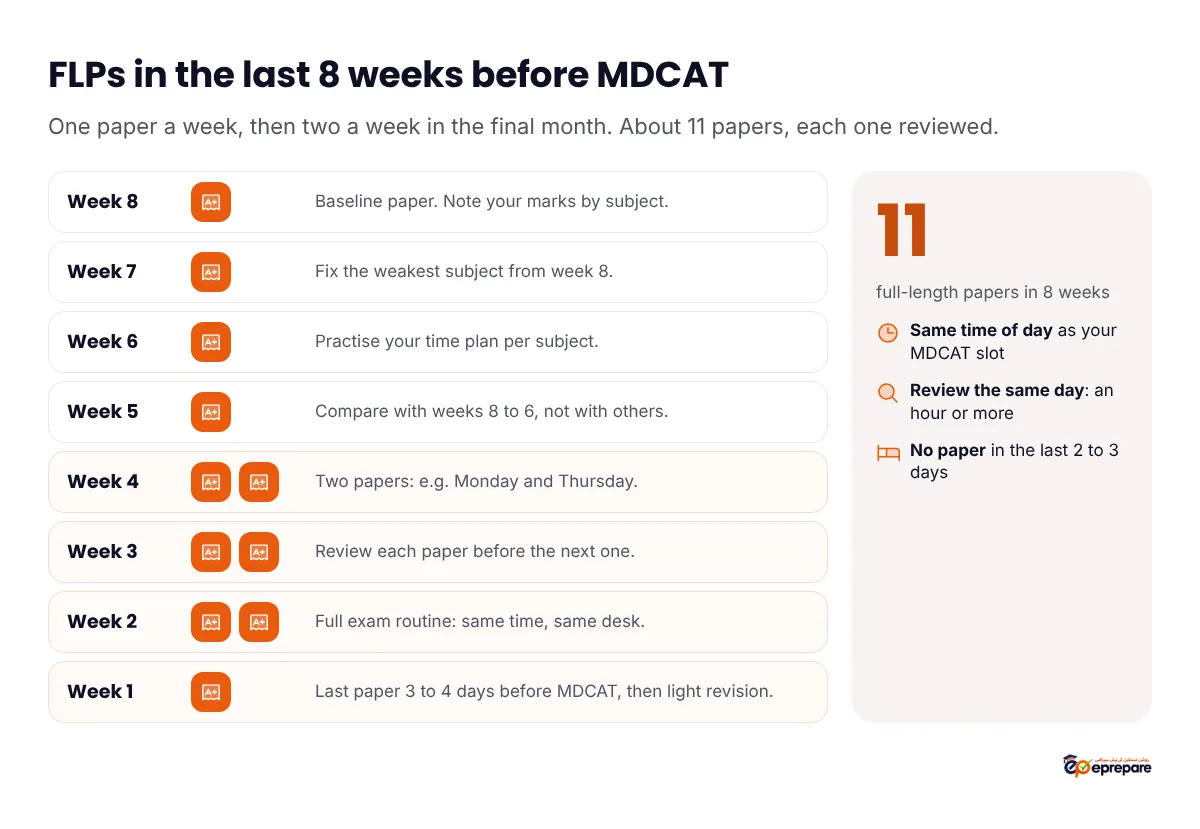
| Weeks before MDCAT | Papers per week | Focus that week |
|---|---|---|
| Week 8 | 1 | Baseline paper. Note your marks in each subject. |
| Weeks 7 to 5 | 1 | Fix the weakest subject from the last paper; practise your time plan. |
| Weeks 4 to 2 | 2 (for example Monday and Thursday) | Full exam routine. Review each paper before the next one. |
| Week 1 | 1, taken 3 to 4 days before MDCAT | Light revision of your Revise-again lists. Rest before the test. |
Fit the FLP stages into this plan in order. If a stage covers only part of the course, sit it once you have finished that part. If you finish every live paper before the eight weeks are up, Advance also has the Quiz Builder's one-tap full-length paper: 180 MCQs with the real subject split and a three-hour timer, as many times as you like.
A sample FLP day
- Before: a light breakfast, water, and your phone on silent. No new chapters that morning.
- The paper: 3 hours in one sitting, at the time of day your MDCAT will start.
- A break: 30 to 60 minutes away from the screen.
- The review: an hour or more, the same day, while you still remember why you picked each answer.
- The next day: fix the sources of your mistakes, not new chapters.
If you are on a tight timeline, our 2-month MDCAT plan shows how these papers fit around the rest of your revision.
How to review an FLP
A paper you do not review is three hours of practice and nothing more. These four steps use the tools already in your account.
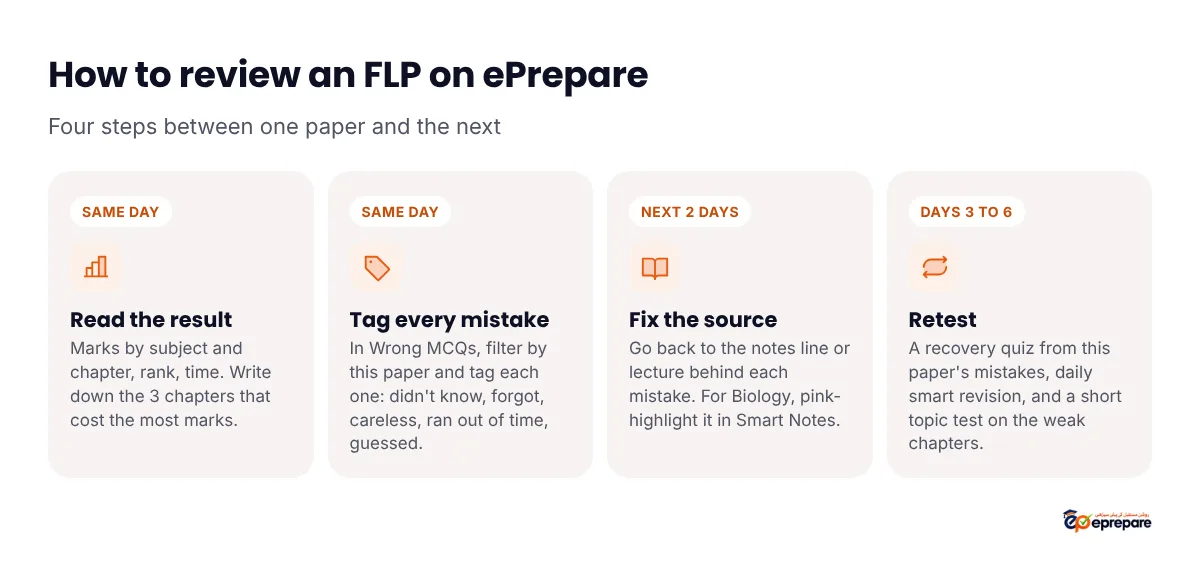
Step 1: Read the result (same day)
Start with marks by subject, then open the chapters inside each subject. Write down the three chapters that cost you the most marks. Check the difficulty split and the confidence check: wrong answers on easy questions, or on answers you marked Sure, need attention first.
Step 2: Tag every mistake (same day)
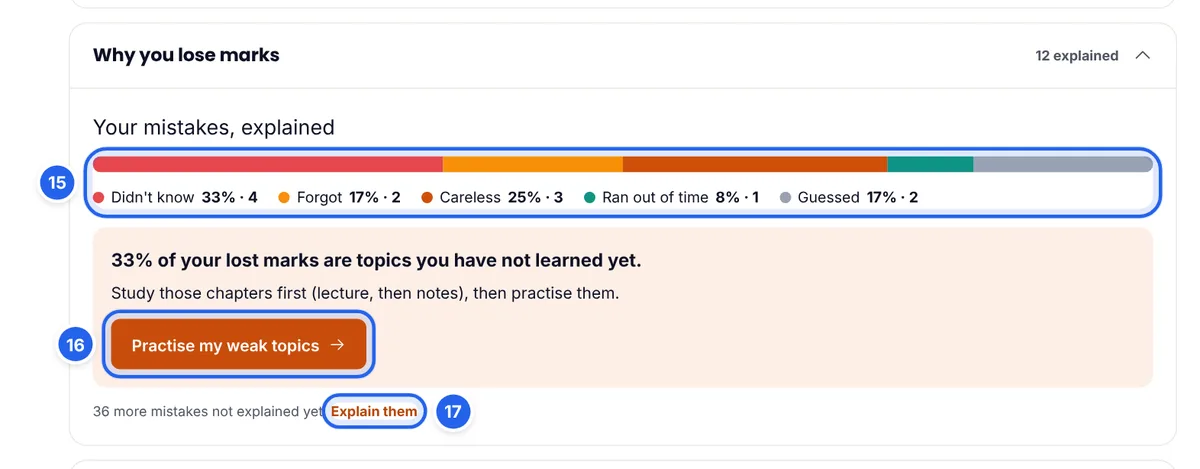
Open Wrong MCQs and filter by the quiz the mistake came from, so you see only this paper. For each one, tap why you missed it: Didn't know, Forgot, Careless, Ran out of time or Guessed. These tags build your "Why you lose marks" report.
Step 3: Fix the source (next 2 days)
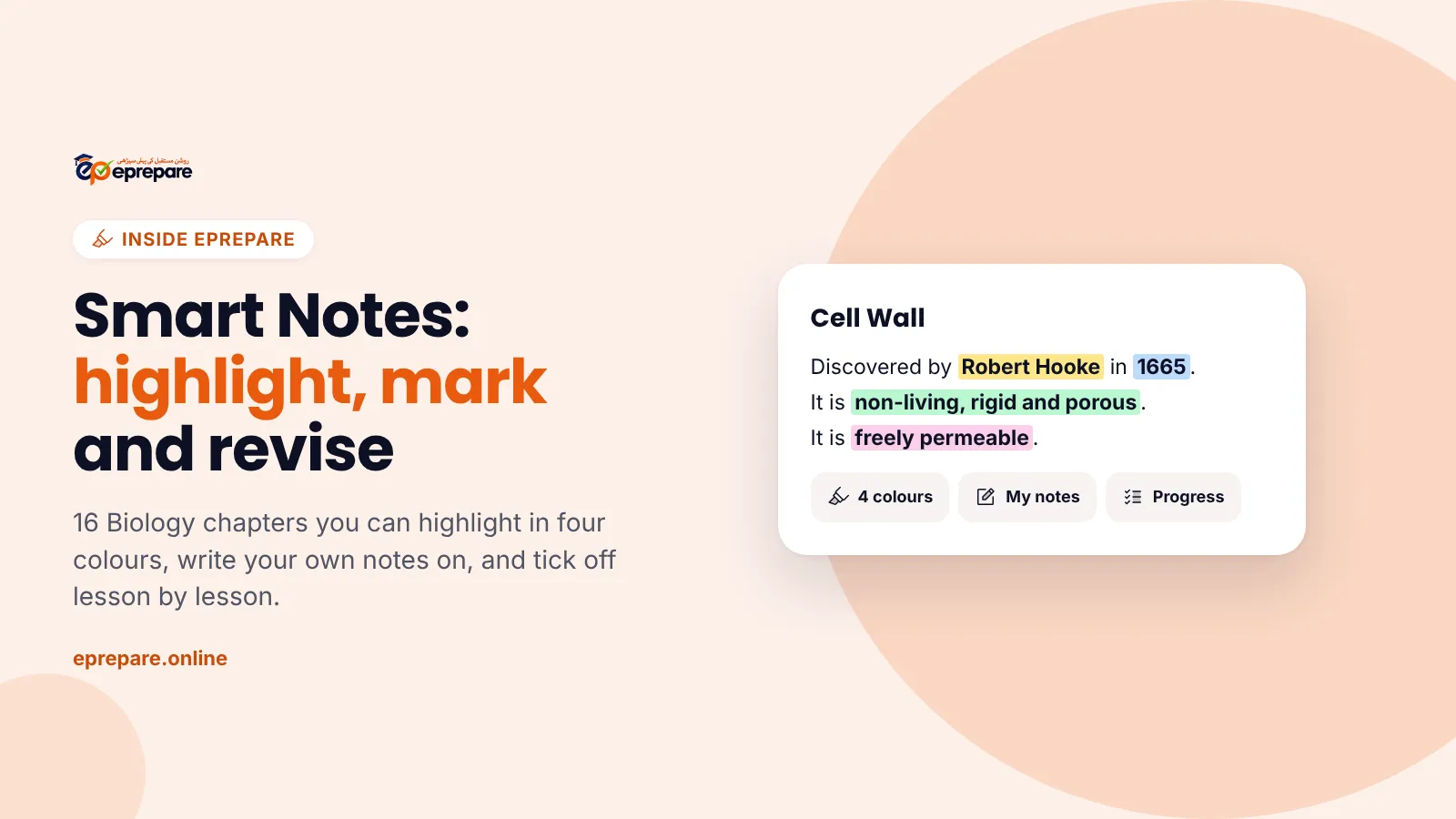
Go back to the line, diagram or formula behind each mistake. For Biology, open the chapter in Smart Notes, find the line and highlight it pink (Revise again), with a one-line note in your own words. For other subjects, use the lecture and the detailed notes. Do not just read the correct option and move on.
Step 4: Retest (days 3 to 6)
- Start a recovery quiz from this paper's wrong MCQs. Every one you get right leaves the list.
- Do your daily smart revision set. Mistakes come back after 1, 3, 7 and 14 days.
- Build a short topic test in the Quiz Builder on your three weakest chapters.
If the stage has a Test 2 you have not sat, take it now. It is the cleanest check of whether the fixes worked.
Mistakes students make with FLPs
- Starting a paper without three free hours. There is no pause, and the timer keeps running if you leave. Start only when you can finish.
- Sitting Test 2 the day after Test 1. You lose the before-and-after check. Fix your gaps first.
- Looking only at rank. Rank tells you where you stand today. Marks by chapter tell you what to do tomorrow.
- Leaving questions blank. With no negative marking, a blank is a lost mark you could have guessed.
- Skipping the review because the score was good. Even a good paper has a "Needs work" chapter.
Which package includes the FLP Series?
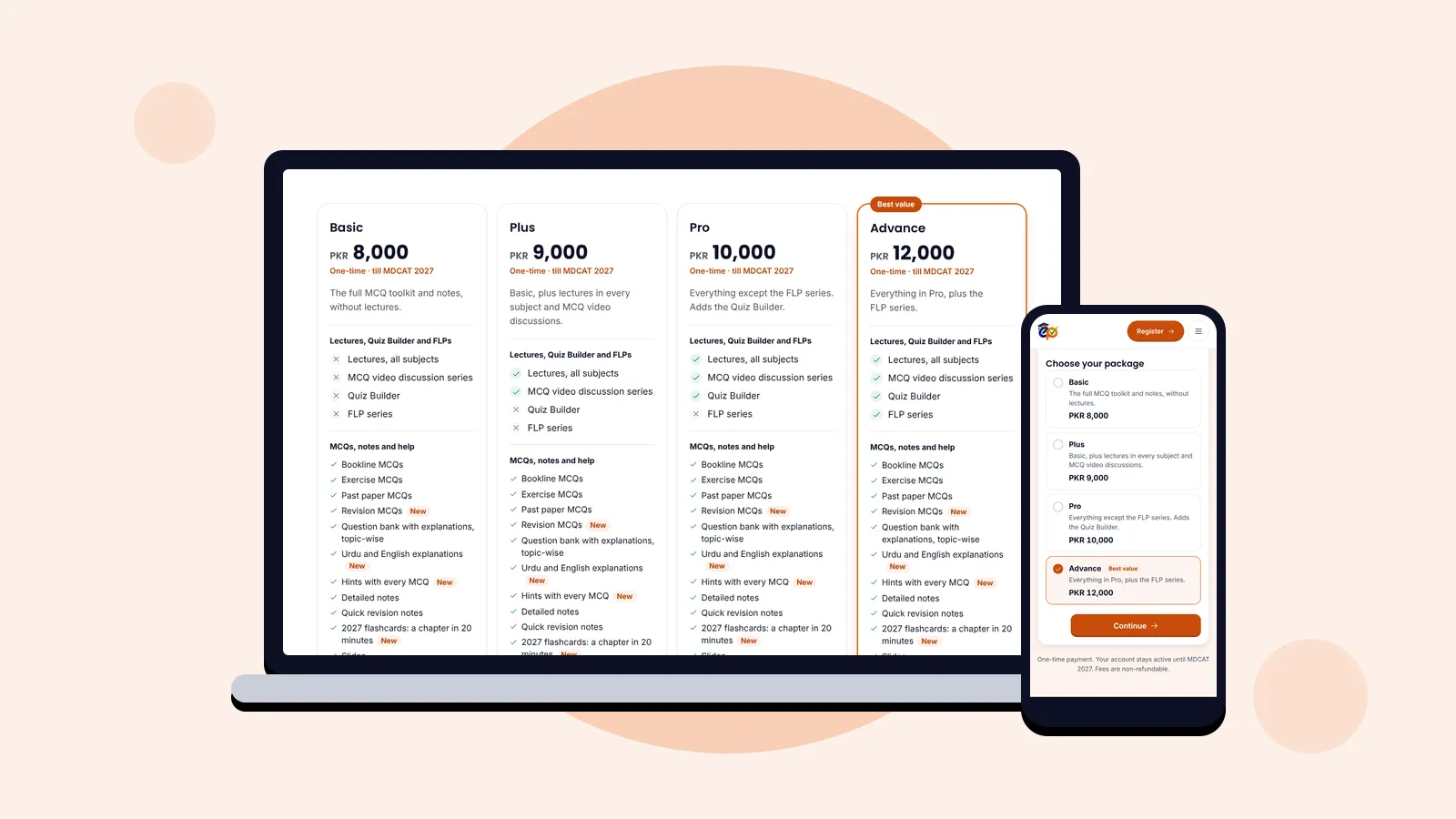
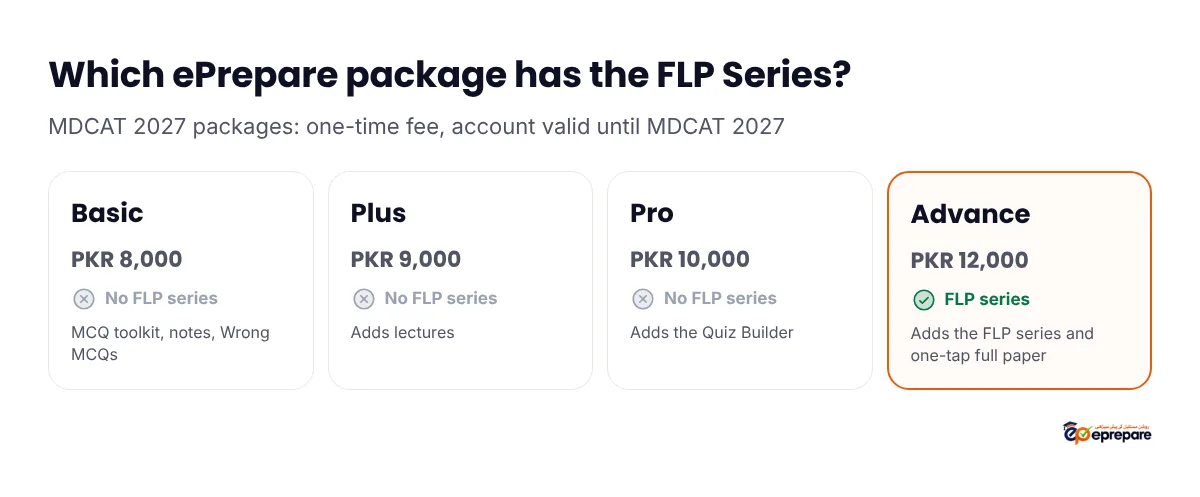
Only Advance. Basic, Plus and Pro do not include FLP attempts. Every package is a one-time fee and your account stays active until MDCAT 2027.
| Package | One-time fee | FLP Series | Quiz Builder |
|---|---|---|---|
| Basic | PKR 8,000 | Not included | Not included |
| Plus | PKR 9,000 | Not included | Not included |
| Pro | PKR 10,000 | Not included | Included |
| Advance | PKR 12,000 | Included | Included, with the one-tap full-length paper |
Wrong MCQs, smart revision, the score predictor and Smart Notes are in every package, so the review steps above work for everyone. Compare all four in our ePrepare packages guide, or see every tool in ePrepare features and benefits.
"The FLPs are well-designed, challenging, and very helpful for MDCAT preparation. They cover important concepts and help me identify my weak areas and improve my overall performance."
Sayed Haroon Shah, Google review (2026)
Frequently asked questions
How many FLPs are there in the ePrepare FLP Series?
The FLP page in the app shows the live count at the top: the number of stages, the total tests, and the MCQs and minutes per test. Each stage has two different papers on the same syllabus.
Is the ePrepare FLP Series free?
No. FLP attempts are part of the Advance package (PKR 12,000, one-time, valid until MDCAT 2027). On other packages you can browse the stages and their syllabus but not sit the papers.
Can I attempt an ePrepare FLP twice?
No. Each paper allows one attempt, like the real MDCAT. That is why each stage has a second paper on the same syllabus. For unlimited full papers, Advance also has the one-tap full-length paper in the Quiz Builder.
What happens if my internet stops or I close the app during an FLP?
Your answers are saved after every change, and the timer keeps running. Reopen the paper and press Resume to continue where you stopped. If time runs out first, the paper submits itself with the answers you saved.
Is there negative marking in ePrepare FLPs?
FLPs are set up without negative marking, matching the PM&DC MDCAT. A wrong answer and a blank both score zero, so attempt every question.
Can I take FLPs on my mobile?
Yes. FLPs work on Android phones, iPhones, tablets and laptops. For a full three-hour paper, a laptop or a tablet is easier on the eyes, but a phone works.
Can I see the correct answers after the FLP?
Yes. Results, answers and the leaderboard open as soon as you submit, and you can review the paper question by question.
When should I start taking FLPs?
Take one occasionally for timing practice early on, then go weekly about three months before MDCAT, and twice a week in the final month. In the last 8 weeks, about 11 papers is a good target.
Rehearse the real exam before the real exam
A full-length paper is the closest thing to MDCAT day you can practise at home, and the review afterwards is where the marks come from. Register on ePrepare with the Advance package to get the FLP Series, or compare the packages first. Not sure which one you need? Ask us on WhatsApp at 0341 4874938.
Sources: the MDCAT pattern (180 MCQs, 3 hours, subject split, no negative marking) is from the PM&DC Uniform Curriculum for MDCAT (PDF, published on Khyber Medical University's site). FLP rules, result details and package contents are from the ePrepare app and our MDCAT 2027 package terms. The review quoted is a public Google review of ePrepare Academy.